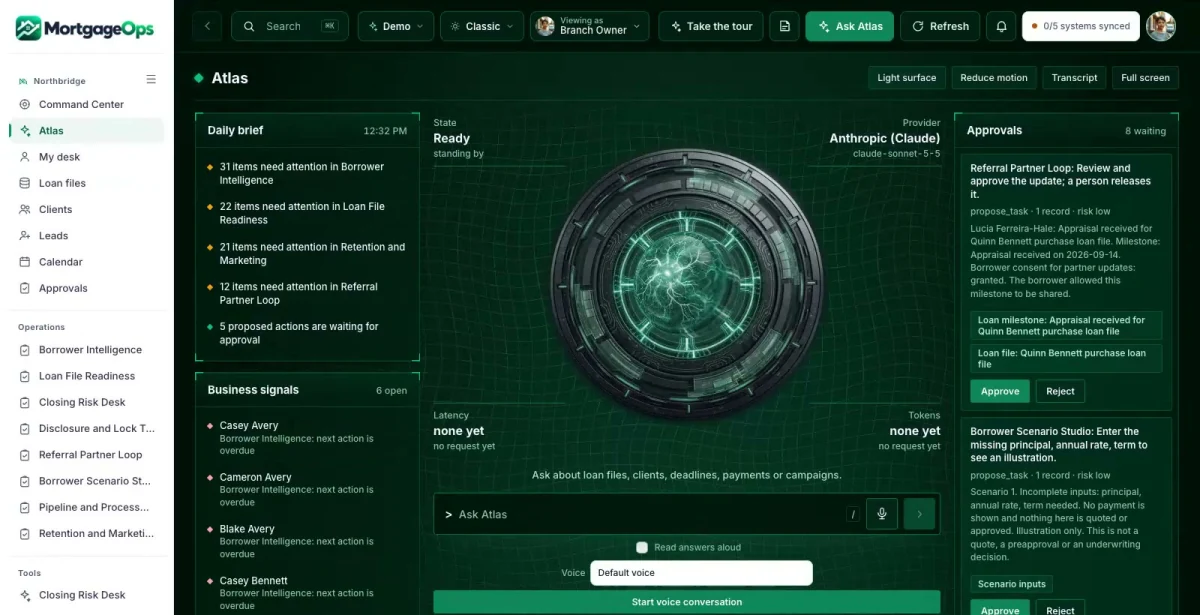

Ask in plain words
Which files have a lock expiring this week with open conditions?
ATLAS answers from the records in MortgageOps, with a link to each source.
MortgageOps is a private command center, member community, company website and ATLAS assistant for mortgage brokers and lenders. It keeps borrower files, conditions, disclosures and locks visible, while licensed staff make every decision.

Ask about anything in MortgageOps. ATLAS answers from your own records, shows the evidence and suggests the next useful step.
ATLAS works inside your role and the permissions your team sets.

Which files have a lock expiring this week with open conditions?
ATLAS answers from the records in MortgageOps, with a link to each source.
Which uploads are received but not yet reviewed?
The answer brings the related records, owners and dates together before anyone decides.
Drafts, messages and record changes wait for a person to approve them, and every completed action has a receipt.
A financing preparation plan, a monthly payment workbook and a closing document organizer give borrowers a reason to join the community.
Stated goals, document readiness and communication preferences sit with the loan file, with the next question to ask.
The loan officer or processor starts with the open conditions, the unreviewed uploads and the dates that matter.
Which files will not close on time?
Open conditions, disclosures and lock dates live in different places until a closing is at risk.
With MortgageOps: The Closing Risk Desk ranks files by target closing, unresolved conditions, unverified receipt and lock expiry, with the evidence and the owner.
Did that document actually get reviewed?
An upload arrives and everyone assumes it satisfied the condition.
With MortgageOps: Loan File Readiness keeps received, reviewed and source-verified apart. An unread upload never counts as satisfied.
What can we tell the referring agent?
Partners ask for status, and staff worry about sharing too much.
With MortgageOps: The Referral Partner Loop shows only the milestones the borrower allowed, never income, credit, documents or underwriting detail.
Real screens from the working MortgageOps command center.
Prioritizes approaching target closings with unresolved conditions, unverified disclosure receipt or lock expiry. Shows the evidence and the owner, and never promises approval or changes loan terms.
Requirement templates follow loan type and professional configuration. Missing documents are requested once with secure uploads, and received, reviewed and source-verified stay separate states.
Records version, issued time, delivery method and actual receipt evidence, with business-day calendar variants and re-disclosure review. LOS and compliance staff own the authoritative status.
Connects goals, permitted document readiness, communication preferences, milestone history and the next question to the actual loan file. Co-borrower and representative access is explicit, never inherited.
Educational principal-and-interest, total housing cost and cash-to-close inputs, with taxes, insurance and HOA kept separate. Saved scenarios are examples, not quotes, preapprovals or underwriting decisions.
Shows age in stage, condition backlog, assigned capacity, handoffs, loan officer coaching and branch goals. Applications, locked volume, closed volume and booked revenue are kept separate.
Permission-based educational nurture, document prep events and annual home-finance check-ins, with rate-review invitations only when real source rates are connected.
Loan files, conditions, document requirements, disclosures and lock dates tracked by owner, with a processor view of capacity and backlog.
A borrower portal and the MortgageCircle community, with consent-controlled status updates for referring real estate professionals.
Applications, locked volume, closed volume and booked revenue kept as separate measures, never blended.
Each one opens in the working MortgageOps command center, inside the roles that may see it.
The MortgageCircle member community is part of the complete set: a public company website, a member area and three free resources. Permitted member requests flow into the MortgageOps command center. In the Northbridge Home Lending demo it runs under the name HomeReady Circle; yours carries your brand.
The community admin shows member intelligence from permitted activity, so you see which resources each borrower used and what they asked for. The offer and value ladder is editable, so you control which consultations members are invited to next.
Staff sign in to the same company and see what their role needs. Borrowers get a private portal with their own work, documents and messages.
Branch Owner. The whole branch: pipeline, risk, capacity and goals.
Processor. Missing documents, unreviewed uploads and lock dates.
Borrower (portal). Their own file, documents and messages.
ATLAS answers from Northbridge Home Lending’s own records and shows the evidence.
People stay in charge. ATLAS drafts and suggests. Anything that goes out or changes a record waits for a person to approve it.
Your company name, branding, services, workflows and data, in your own private copy of the command center, the member community and the company website.
Your logo, colors, vocabulary, roles and workflows. Your company gets its own private copy with its own data.
Our goal is to reduce build cost by 70 to 90% versus a comparable from-scratch command center, by adapting an existing foundation instead of rebuilding it.
Your proposal spells out the workflows, users, connections and any outside platform costs before you commit. We confirm the schedule once we know your systems.
Savings target compared with a similarly scoped from-scratch build. Your quote and launch date depend on customization, integrations, data readiness and ongoing services. Complex builds take longer.
No sign-in needed. Start with the guided tour, then use the Viewing as switcher to change seats. Data resets nightly.
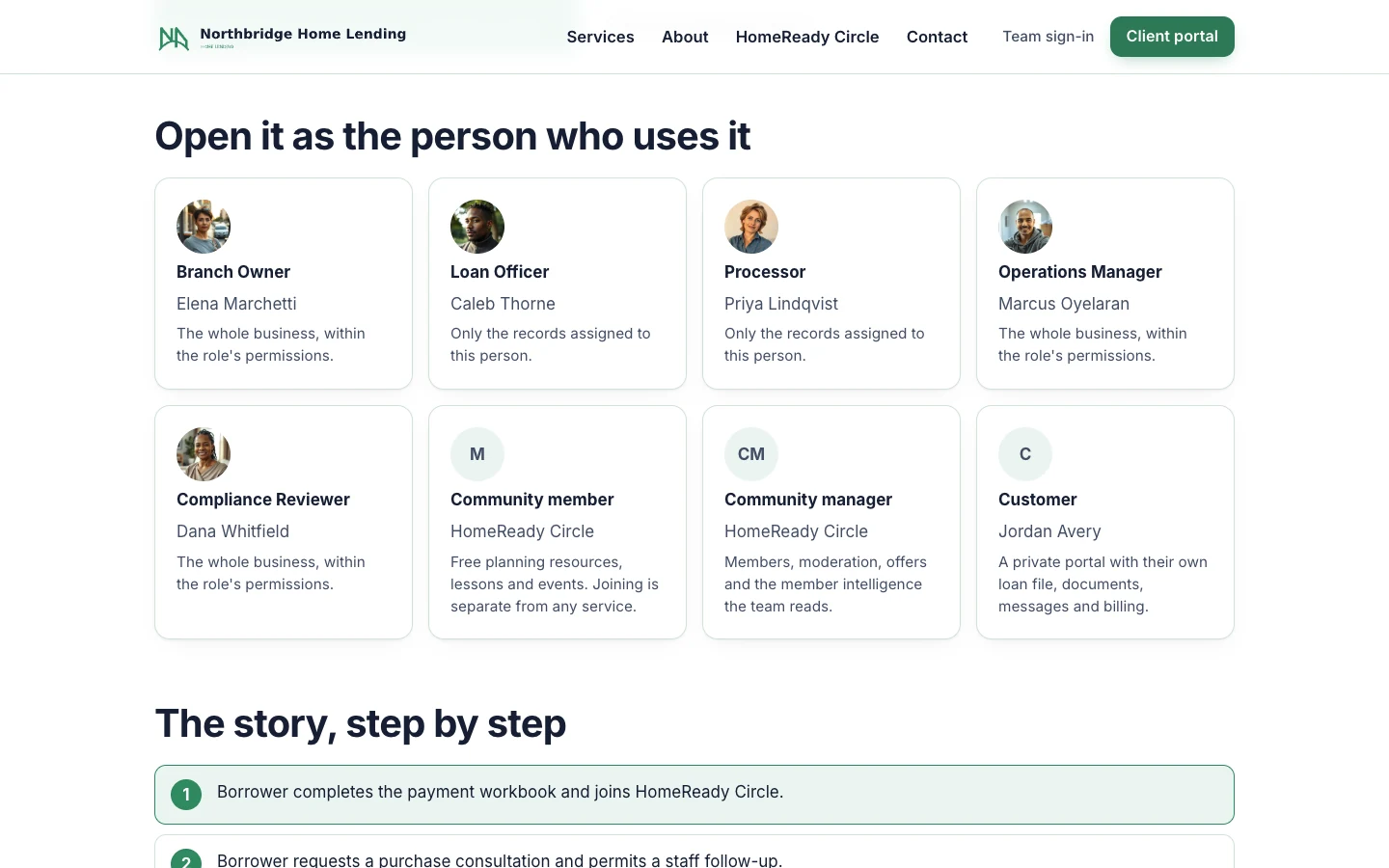
Start at the demo hub for Northbridge Home Lending and pick a seat.
Open the demo ↗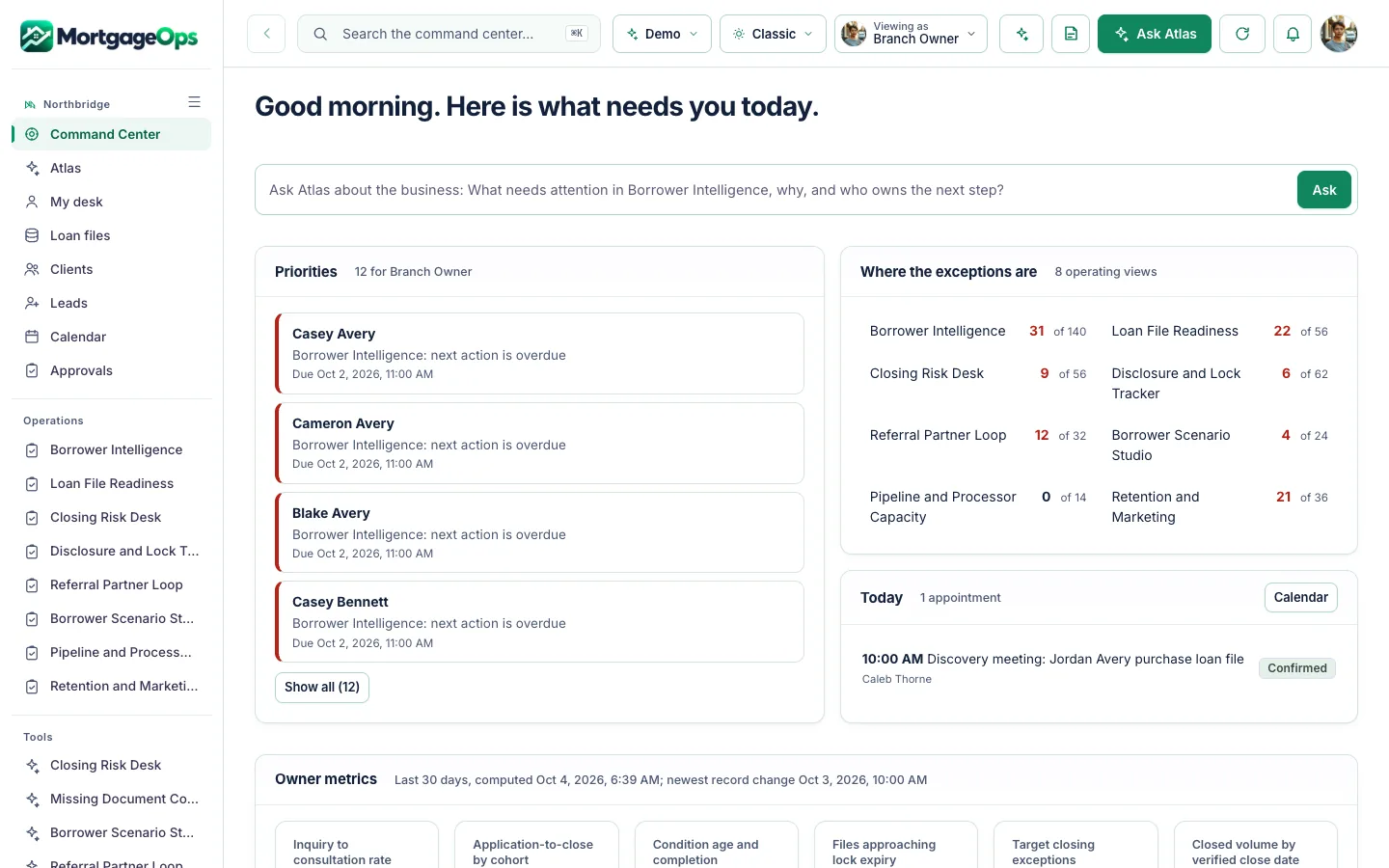
Opens the command center already signed in as the Branch Owner.
Open the demo ↗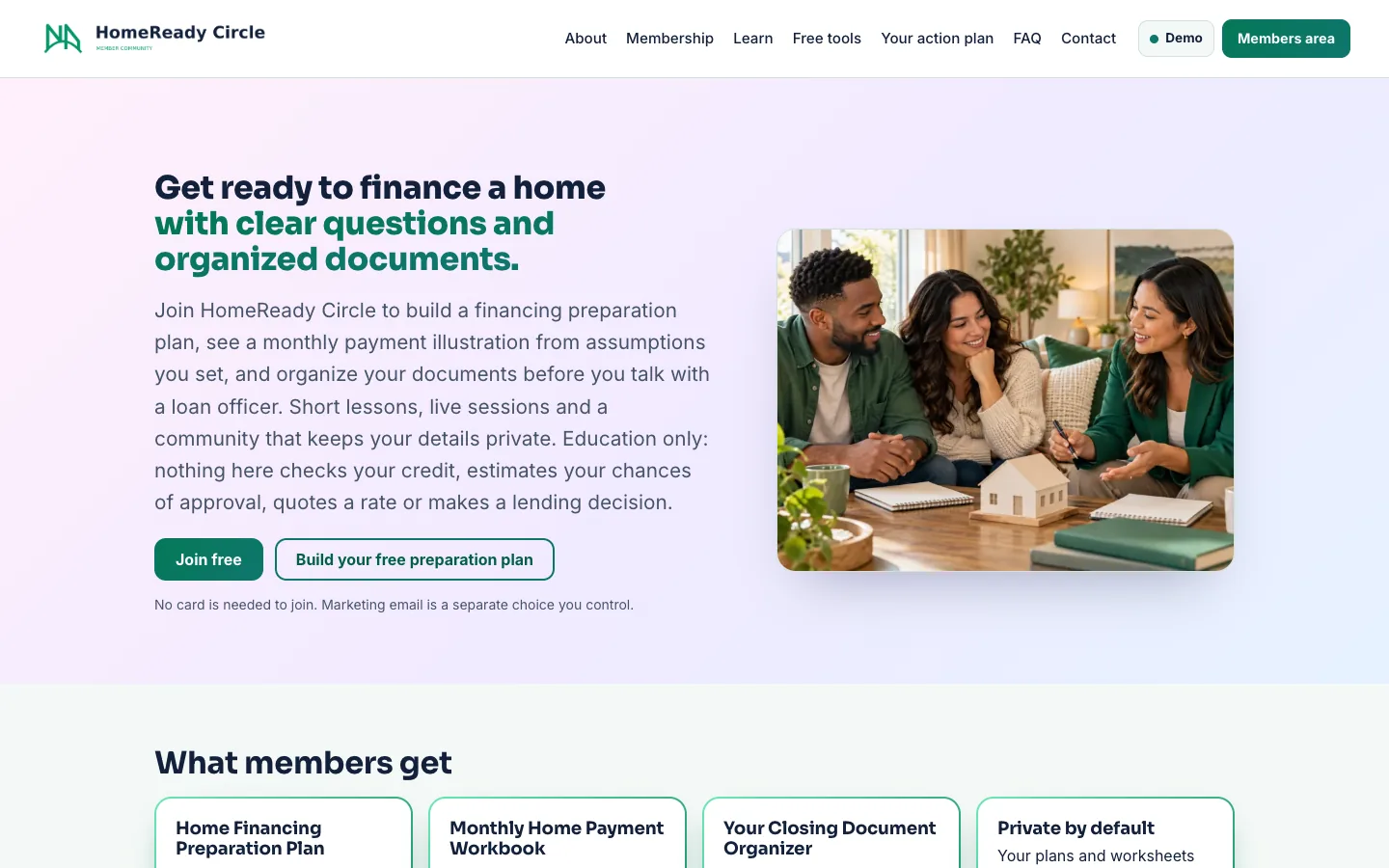
Opens HomeReady Circle, the Northbridge Home Lending’s member community, as a member.
Open the demo ↗Each row shows what works today. Native features are built in; the other connections are simulated, imported or planned until we connect and test them in your scope. The Integrations screen shows each connection’s real state.
Native: built in and tested in the demo. Demo: sample or simulated behavior only. Planned: designed, not built.
A 15-minute walkthrough with your business in mind.
Workflows, users, connections and outside platform costs, in writing, before you commit.
Your brand, vocabulary, roles and the connections in scope, on your own private copy.
We confirm the schedule once we know your systems.
The AI Command Center core plan is $497/month with an agreed initial scope. Your proposal lists what is included (systems, users, automations, AI usage, hosting, support and onboarding) and any outside platform costs before you commit. The MortgageCircle member platform and any complex connections are quoted with your scope.
Yes. Every customer gets its own private copy of MortgageOps: its own code, server and database, holding only its own data.
Yes. Your logo, colors, company name and vocabulary. Your team sees your brand, not ours.
No. Northbridge Home Lending is a fictional company and its records are sample data. Your own company, branches and loan files replace them in your copy.
No. MortgageOps organizes files and next steps. Licensed staff make every approval, disclosure and pricing decision. Payment scenarios are educational examples, never quotes or preapprovals.
Yes. MortgageOps is sold as a complete set: the command center, the MortgageCircle member community, the company website and ATLAS. MortgageCircle can also run on its own.
No. ATLAS drafts and suggests. A person reviews and approves anything that goes out or changes a record.
It depends on your users, workflows and connections. Book a live demo and we will scope it with you; your proposal lists what is included and any outside platform costs before you commit.

Book a 15-minute live demo. We will walk through MortgageOps with your branches, loan types and processing flow in mind, and agree what a first scope could look like.
The same proven foundation, shaped for other industries. Not in one of them? We build yours.
 Scope, change orders and budgets in one cockpit, for builders.Explore BuildOps →
 Households, listings and offers in one cockpit, for brokerages.Explore EstateOps →
 Owners, leases and maintenance in one cockpit, for property managers.Explore PropertyOps →
 Arrival readiness and service recovery, for hotels and inns.Explore HospitalityOps →
 Scheduling, intake and referral loops, for health practices.Explore HealthOps →
 Customers, stock and margin-aware campaigns, for retail stores.Explore RetailOps →