Customer experience app examples: eight live journeys

A public website explains your offer. An experience app helps a customer, or the team serving them, do something after that: book, check in, ask for service, approve work or return to a member area. The best place to start is one awkward handoff, not an AI feature.

Explore Experience AppsCompare product types

Written by Corey Gray, founder of Launch Automation. Reviewed November 24, 2026.

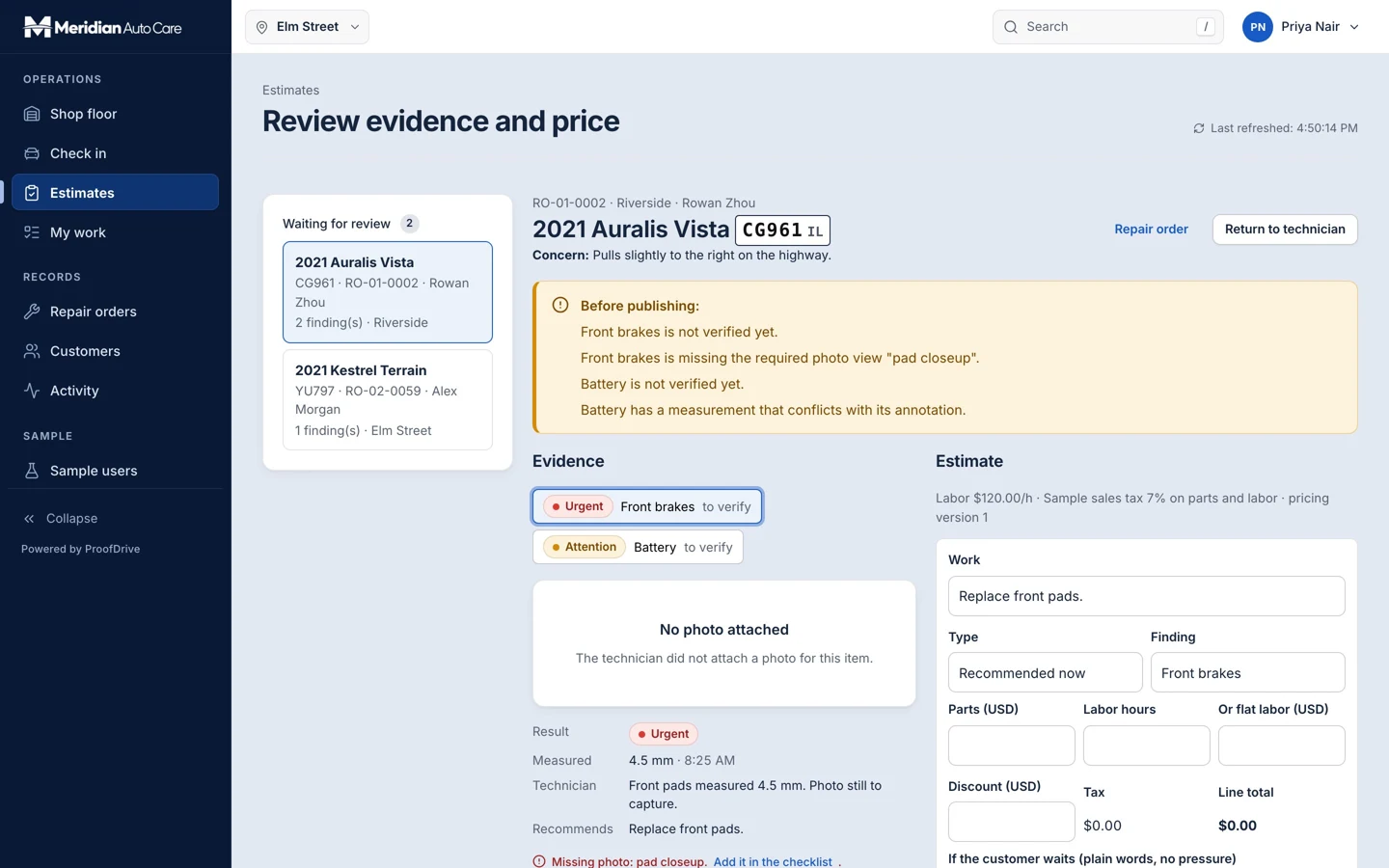
ProofDrive customer approval view with inspection evidence, repair choices and estimate details
ProofDrive is a working demonstration of a customer approval flow. It is an example of a workflow, not a client result.

The short answer

Choose one journey. Show what the customer sees, what the team sees and what happens when something goes wrong. AI can organize an incoming request, suggest a next step, summarize context or help staff find a record. A person should still approve decisions about money, access, safety, availability or a customer promise.

Eight useful experience-app journeys

1. Book a visit and keep the plan together

An entertainment venue, salon, fitness studio or event business can give a customer one place to choose a date, select an experience and keep details together. ParkFlow demonstrates booking, party planning, check-in and capacity context. For charter operators, use the guest check-in checklist to plan trip details and the crew handoff.

2. Turn a service request into a useful handoff

A homeowner should not have to repeat the problem to a form, call-center agent and technician. RelayHome demonstrates a path from request to intake review, dispatch and technician context.

3. Give members a first action and a return action

A member can choose a goal, complete a lesson, join a discussion or find a resource. The member journey needs a clear reason to return before an AI assistant is added. See the membership platform examples.

4. Make an appointment feel like a plan

A salon or wellness app can help a guest browse choices, send a request and arrive with the right context. PolishSuite demonstrates shade browsing and a front-desk request handoff. VisitWell shows a spa guest sharing comfort preferences and requesting refreshments, with staff reviewing service enhancements. Read the spa guest experience guide for a pilot checklist. See how to organize a digital nail polish color chart and test the handoff in your own salon.

5. Put approval evidence in front of the customer

Projects with several steps often create status-call fatigue. ProofDrive demonstrates inspection evidence, itemized repair choices and a record of what the customer approved.

6. Make pet care booking and check-in easier

Pet owners can request daycare, boarding or grooming and see stay updates. PawPass shows how staff can keep arrivals, vaccination details and room capacity together.

7. Turn a grocery list into a store-ready trip

A grocery shopper can begin with a recipe, weekly meals or a party plan, then turn it into a list connected to the store's products, package sizes, suggested swaps and aisle guidance. GatherCart demonstrates that customer journey alongside the team workspace that handles catalog questions and support. See how to turn a recipe into a store-specific shopping list and test product matches before launch.

8. Get restaurant locations ready before a rollout

Restaurant guests notice when a new offer launches without a clear handoff. BrandPilot shows the team journey behind that guest experience: headquarters publishes approved guidance, staff practice the conversation and complete assigned checks, then managers review evidence before a location is marked ready. In the free restaurant demo, explore the shift brief and a sample menu rollout. The practice conversation is scripted, and the restaurant and its data are fictional. Use the restaurant rollout checklist to plan your own brief, practice and manager review.

How to choose the first experience app to build

Start with the point where a customer has to repeat themselves, wait for an answer or call for a simple status update. Match the first version to one visible job:

During a demo, test one real customer or team task on a phone. Ask whether the person can finish it without a phone call, whether the team receives the details they need and what happens if the request is incomplete. Those answers define the first build better than a feature list does.

What AI should and should not do

Useful support

Find a relevant record, summarize approved information, request a missing detail, route a request for review and explain the next step in plain language.

Keep people in charge

Do not let AI promise a price, date, slot or outcome. It should not decide access, billing, safety or eligibility, and it should not send a customer message based on guessed information.

The first-version test

Pick one frequent journey

Choose a customer task that creates repeated questions or a lost handoff today.

Watch people use it without coaching

Record where they hesitate, what they expect and what staff need to fix afterward.

Improve the handoff before expanding

If the app removes one repeated question or one lost handoff, it has a job worth improving. If it only looks futuristic, keep the scope small.

Need to compare the cost before you scope it? Use the custom web app cost guide to compare first-year charges, integrations and ongoing support.

Questions business owners ask

What is an experience app?

An experience app helps a customer complete work after they have learned about a business, such as booking, checking in, sending a request, reviewing an approval or returning to a member area.

What should AI do in a customer-facing app?

AI can organize an incoming request, suggest a next step, summarize context or help a staff member find a record. A person should approve decisions about money, access, safety, availability or a customer promise.

How should a business test an experience app?

Choose one frequent customer journey, watch people use it without coaching and record where they hesitate, what they expect and what staff must fix. Improve a real handoff before adding more features.

What should a first version of an experience app include?

One customer task, a clear next step for staff, useful context passed between them and a safe way to handle incomplete requests. Add AI only where it makes that handoff easier to review.