“Do I really need that?”
A verbal explanation can sound like another upsell.
Put the technician’s evidence beside the recommendation.
Give customers a repair approval app with inspection photos, plain-language findings and itemized prices. They choose the work they want. Your shop gets a clear record of the estimate they approved.
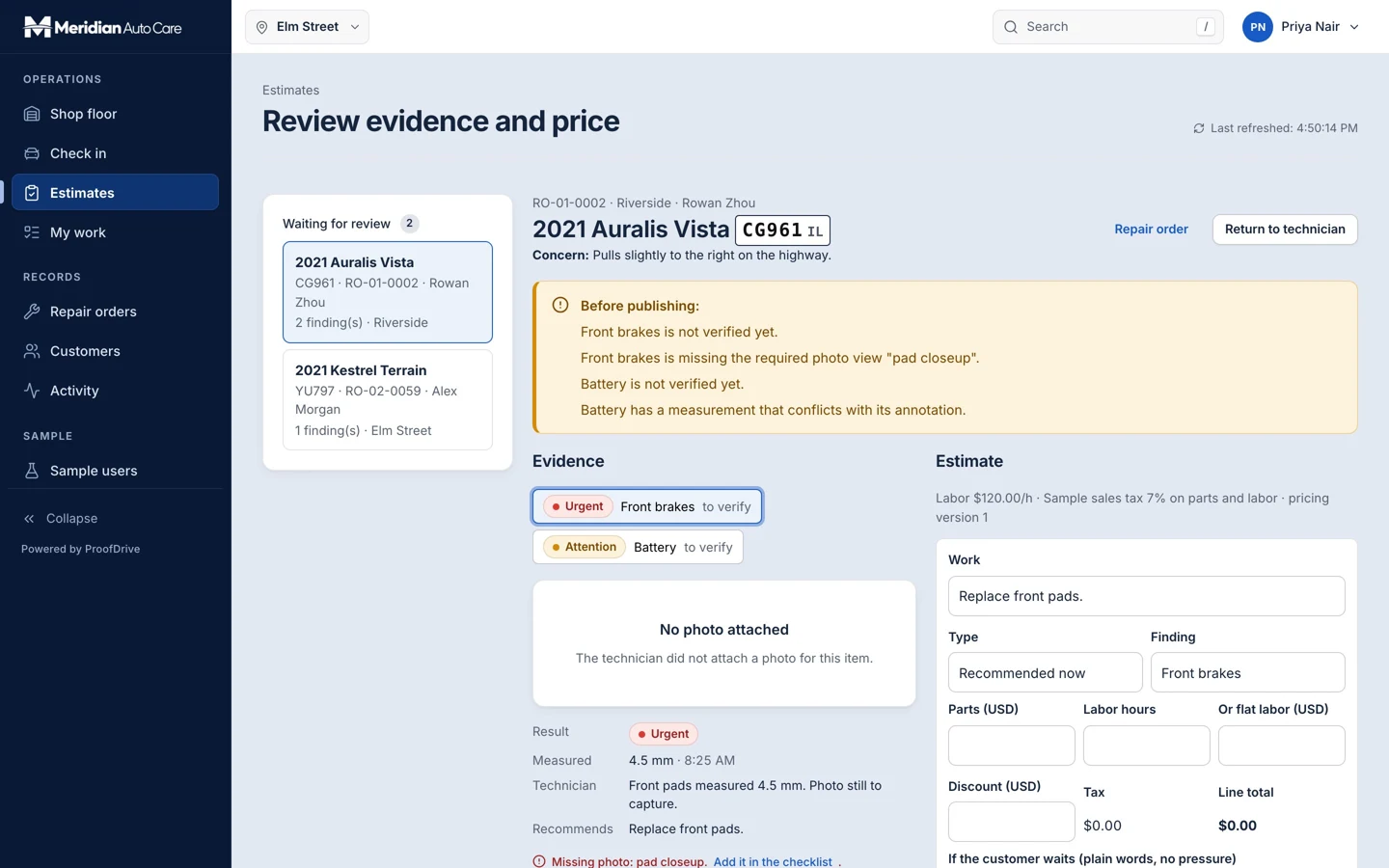
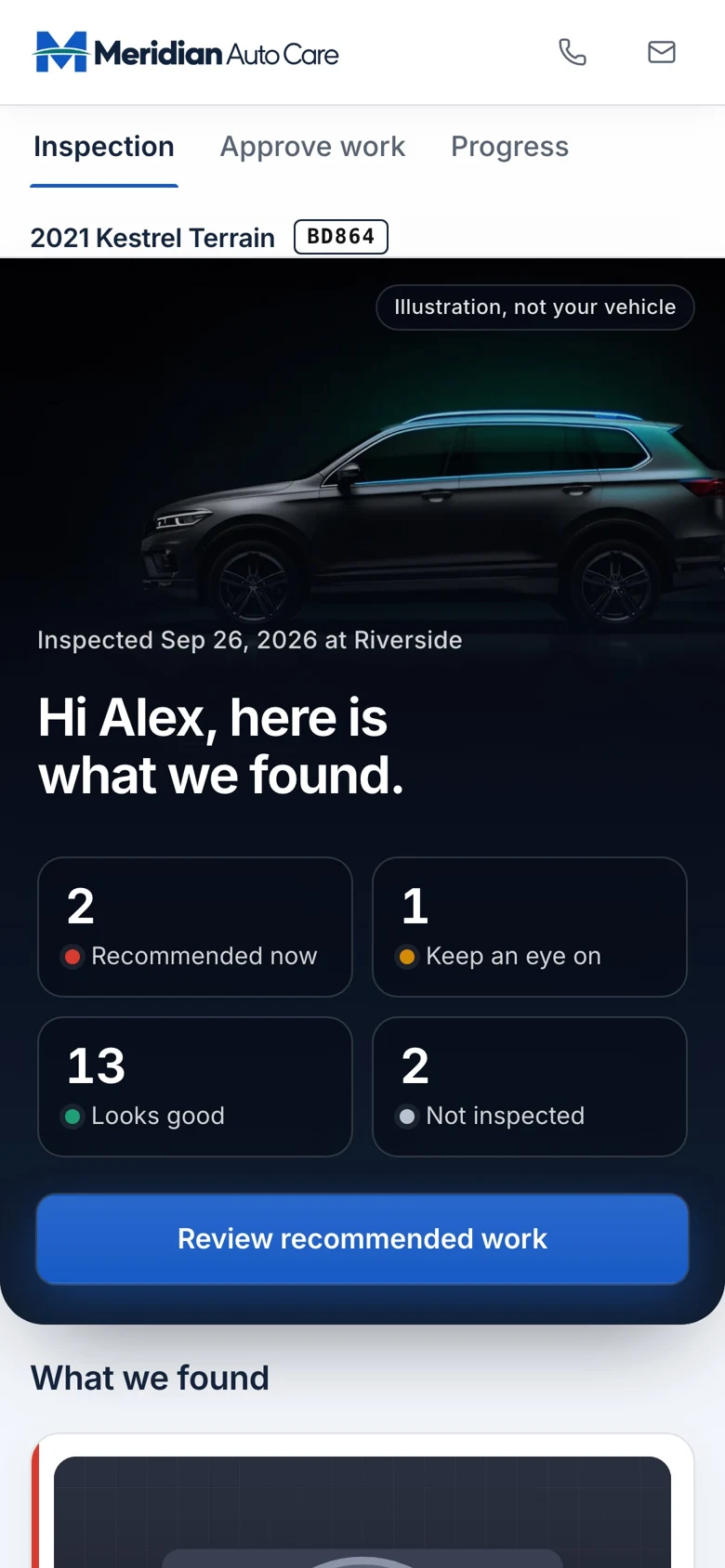
Findings and supporting photos establish what was observed.
Reviewed recommendations show exact scope and prices for selection.
The shop follows the decision tied to its fixed estimate revision.
A verbal explanation can sound like another upsell.
Put the technician’s evidence beside the recommendation.
A vague yes creates confusion at the service desk.
Capture exact selected lines against a fixed estimate revision.
Pending decisions can disappear into calls and messages.
Bring approval status and shop work into a shared view.
ProofDrive shows what is possible. We customize the branding, content, customer journey and staff workflows for your business. Your customers use your experience.
Your logo, colors, products, services, locations and way of working. Start with a proven foundation and make the experience your own.
Our goal is to reduce build cost by 70% to 90% versus a comparable from-scratch experience app, by adapting an existing foundation instead of rebuilding every component.
Straightforward projects can go live within a week once scope, content and access are ready. We confirm your schedule before the work begins.
Savings target compared with a similarly scoped from-scratch build. Your quote and launch date depend on customization, integrations, content readiness and ongoing services. Complex builds take longer.
Give customers the evidence, explanation and itemized decision in one phone-friendly link. No guessing what “approved” meant.
Explore the real screens
Opens the demo. Choose the matching view shown above.

Technicians capture findings. Advisors review and publish. Managers follow approvals and work. HQ compares inspection quality.
See the team workspaceOpens the demo. Choose the matching view shown above.
Connect each finding to the technician’s evidence, so customers can understand the proposed work.
Let customers review specific repairs and prices through their visit link.
Tie approved lines to an estimate version and carry that decision into the bay workflow.
Try your own assumptions. This is an opportunity model, not a forecast.
Volume × opportunity rate × value
Illustrative assumptions. Not measured results, guaranteed revenue or profit. Excludes app fees and other costs.Open ProofDrive and choose a view, or start its guided tour to see how a request moves between people.
See what the customer, frontline team and company leaders see.
The guided tour moves between views and explains what happens next.
Opens the demo hub. Choose “Start the guided tour” there.

The customer reviews inspection evidence and proposed repairs.
See it liveThe technician records findings and supporting photos.
See it liveThe service advisor reviews the evidence and customer plan.
See it liveThe shop manager monitors the work moving through the location.
See it liveGroup leaders review inspection quality across locations.
See it liveThe company admin manages inspection standards and settings.
See it liveFollow “The technician captures evidence” in the guided tour. The tour explains the action and shows what happens next.
See it liveFollow “The advisor verifies, prices and publishes” in the guided tour. The tour explains the action and shows what happens next.
See it liveFollow “The customer sees what was found” in the guided tour. The tour explains the action and shows what happens next.
See it liveFollow “The customer approves exact lines” in the guided tour. The tour explains the action and shows what happens next.
See it liveThe app’s built-in demo controls.
See it liveThe app’s built-in demo controls.
See it liveExplore the workflows shown in the demo. We confirm the features, rules and connections for your business before production.
The demo uses sample repair records. Real approvals remain attached to a specific estimate revision. Results depend on your customers and workflow.
Capture the original evidence with each finding.
Keep photos, observations and recommendations together.
Customers select the specific work they want to authorize.
Tie the decision to the scope and price presented.
Changed work requires review rather than reusing an old approval.
Follow the visit from inspection toward pickup.
Checklists and evidence capture support consistent inspections.
Verify explanations and pricing before the customer sees them.
See pending decisions and work across the floor.
Compare inspection completeness and manage shared checklists.
One inspection workflow, one shop. Measure approval time, evidence completeness and authorization clarity before expanding across the group.
Book your demoWe map your customers, team, locations and goals. You get a clear scope, quote and launch plan.
We tailor the brand, content and workflows, then test the complete journey with your team. Straightforward launches can be ready in as little as a week once content and access are ready.
Launch the agreed experience, measure what changes and plan the next improvement or location rollout.
It connects inspection findings and photos to a customer-facing estimate. ProofDrive lets customers review proposed work and approve specific lines at a specific price.
Approval should stay attached to the exact estimate version. If scope or price changes, your workflow must request a new approval before that changed work proceeds.
We review repair-order ownership, customer records, APIs and permissions during scoping. A supported connection is agreed and tested rather than assumed.
The example includes a quality view across shops. Production reporting depends on consistent inspection fields, evidence standards and data from the locations in scope.
Your quote depends on the workflows, locations, data and integrations in scope. Our goal is to reduce build cost by 70% to 90% versus a comparable from-scratch experience app, by reusing an existing foundation. That is a savings target, not a guarantee. We separate build work, ongoing services and third-party costs in your proposal. Book a demo for a tailored quote.
A focused launch can sometimes be ready within a week after scope, content and access are ready. Catalog imports, integrations, approvals and complex rollouts need more time. Your proposal confirms the schedule.
Yes. We tailor your logo, colors, content and agreed workflows. The web experience runs on supported phones, tablets and computers without an app-store download. Your device and access requirements are tested before launch.
Show us your inspection and approval process. We’ll map an experience that helps customers understand the work and gives your team a clearer next step.
 Spas & wellness groupsExplore the app
 Grocery chains & supermarketsExplore the app
 Hardware & home-improvement retailersExplore the app
 Heating, cooling & plumbing companiesExplore the app
 Family entertainment & adventure parksExplore the app
 Equipment rental networksExplore the app
 Restaurant franchises & hospitality groupsExplore the app
 Nail salons & studio groupsExplore the app
ProofDrive is shown with a fictional business and sample data.
