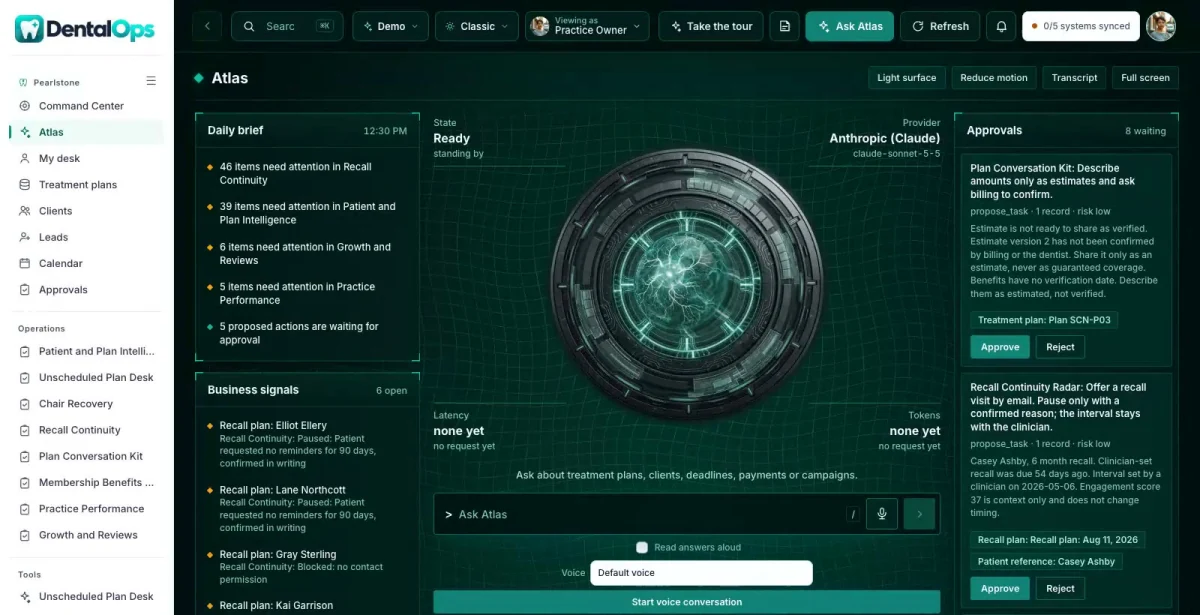

Ask in plain words
Which reviewed plans have no appointment yet?
ATLAS answers from the records in DentalOps, with a link to each source.
DentalOps is a command center, member community, company website and ATLAS assistant in one system for independent dental practices and small dental groups. Your team sees the schedule, plans and recall in one place. Clinicians decide care.

Ask about anything in DentalOps. ATLAS answers from your own records, shows the evidence and suggests the next useful step.
ATLAS works inside your role and the permissions your team sets.

Which reviewed plans have no appointment yet?
ATLAS answers from the records in DentalOps, with a link to each source.
Who is overdue for recall and allowed to be contacted?
The answer brings the related records, owners and dates together before anyone decides.
Drafts, messages and record changes wait for a person to approve them, and every completed action has a receipt.
A first-visit planner and a smile goals workbook bring in people with real questions, and a free community keeps them close.
Permitted preferences, questions and plan history sit next to the member, so the front desk knows what was asked and what was agreed.
Staff see the next administrative step, book the visit and follow up. Clinicians review anything clinical before it reaches a patient.
Who has a reviewed plan and no appointment?
Plans sit in the chart after the consult, and nobody sees which ones went quiet.
With DentalOps: Unscheduled Plan Desk lists reviewed plans with no booked visit, the last permitted contact and the missing step. Access and timing questions come first.
A slot opened up. Who can take it?
The front desk scrolls a waitlist by hand while the chair sits empty.
With DentalOps: Chair Recovery matches the open operatory and provider time to permitted waitlist entries by visit type and approved duration, and checks the booking for each match.
Who is overdue for recall?
Overdue lists are long, stale and include people who asked not to be contacted.
With DentalOps: Recall Continuity ranks patients by days overdue on the clinician's interval and leaves out paused outreach and missing contact permission.
Real screens from the working DentalOps command center.
Lists reviewed plans with no booked appointment, the last permitted contact and the missing administrative next step. Access and timing questions come before any treatment promotion.
Matches open operatory and provider time to requested appointment type and approved duration. Conflicting reservations are prevented and source appointment IDs are kept.
Clinician-configured recall intervals and existing communication preferences drive the queues. Staff can pause outreach and record confirmed reasons without changing treatment.
Explains the practice-approved process and supplied estimate components. Each amount is labeled verified, estimated, insured or patient responsibility, and financing referrals are reviewed.
Links clinician-approved plan references, patient-stated questions, recall dates, scheduling barriers and administrative history. It does not infer which clinical treatment is best.
Explains an approved office membership plan, its benefits, restrictions, renewal and cancellation. It is never presented as insurance and never mixed up with the free educational community.
Opt-in lead magnets, a consultation inquiry and office membership information, all reviewed by licensed staff before anything is promised.
Chair recovery, provider schedule blocks, recall queues and plan follow-up, with the clinician's approved plan as the source.
A patient and member area for appointment questions, the office membership plan and approved education. No clinical documents in the public community.
Scheduled versus completed work, cancellation recovery and unverified balances, without projecting production from proposals.
Each one opens in the working DentalOps command center, inside the roles that may see it.
The DentalCircle member community is part of the complete set: the public website, the member area and three free resources. It connects permitted member requests to the command center, so the front desk sees what was asked. In the Pearlstone Dental demo it runs under the name SmilePath Circle; yours carries your brand.
Member intelligence shows what each member asked for and which resources they used, so the next conversation starts with context. The editable offer and value ladder in the community admin sets which service conversations members are invited to, and licensed staff review them.
Staff sign in to the same company and see what their role needs. Patients get a private portal with their own work, documents and messages.
Practice Owner. Schedule recovery, plan follow-up and recall across the practice.
Treatment Coordinator. Reviewed plans with no appointment and the next administrative step.
Patient (portal). Their own appointments, documents and messages.
ATLAS answers from Pearlstone Dental’s own records and shows the evidence.
People stay in charge. ATLAS drafts and suggests. Anything that goes out or changes a record waits for a person to approve it.
Your company name, branding, services, workflows and data, in your own private copy of the command center, the member community and the company website.
Your logo, colors, vocabulary, roles and workflows. Your company gets its own private copy with its own data.
Our goal is to reduce build cost by 70 to 90% versus a comparable from-scratch command center, by adapting an existing foundation instead of rebuilding it.
Your proposal spells out the workflows, users, connections and any outside platform costs before you commit. We confirm the schedule once we know your systems.
Savings target compared with a similarly scoped from-scratch build. Your quote and launch date depend on customization, integrations, data readiness and ongoing services. Complex builds take longer.
No sign-in needed. Start with the guided tour, then use the Viewing as switcher to change seats. Data resets nightly.
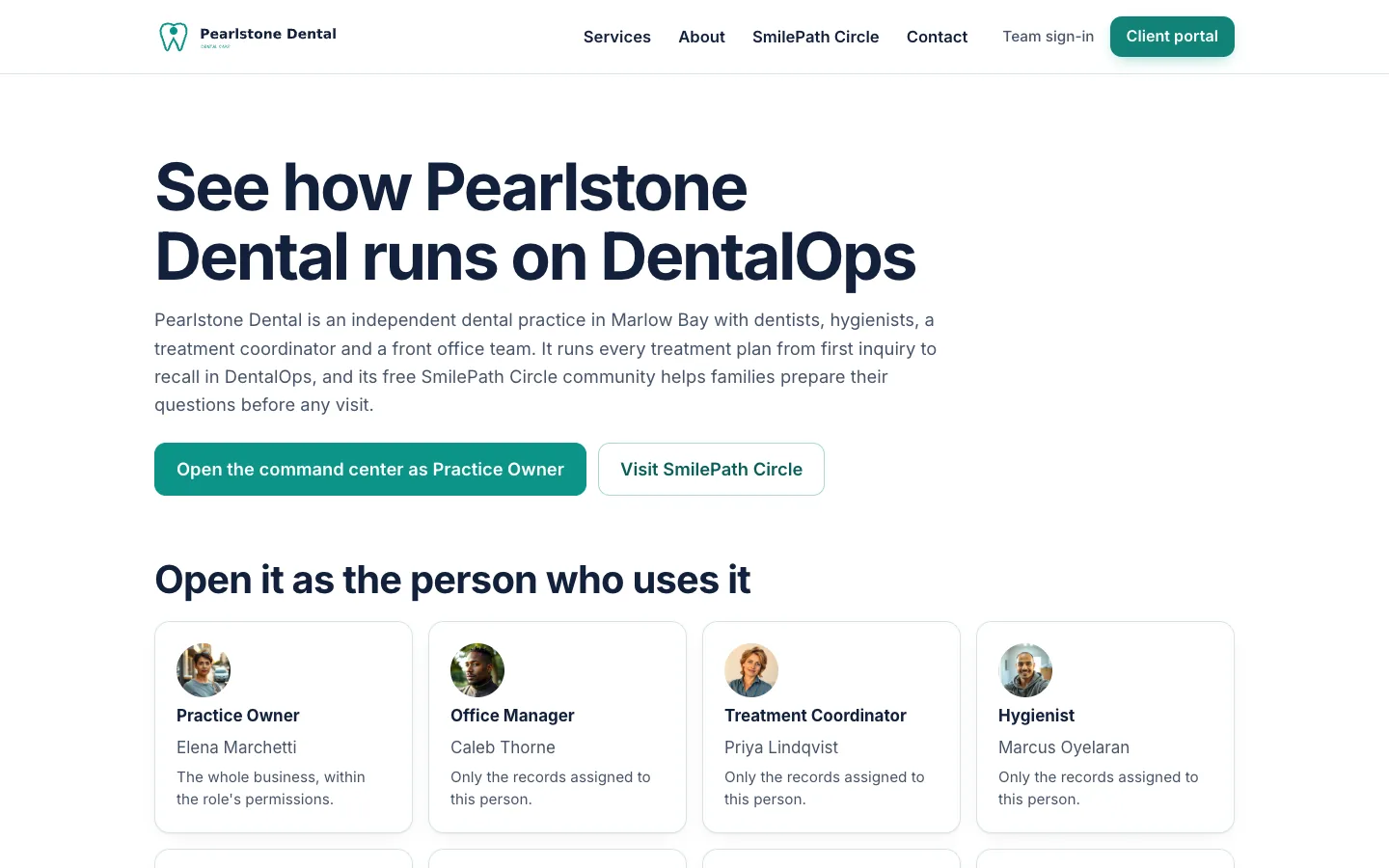
Start at the demo hub for Pearlstone Dental and pick a seat.
Open the demo ↗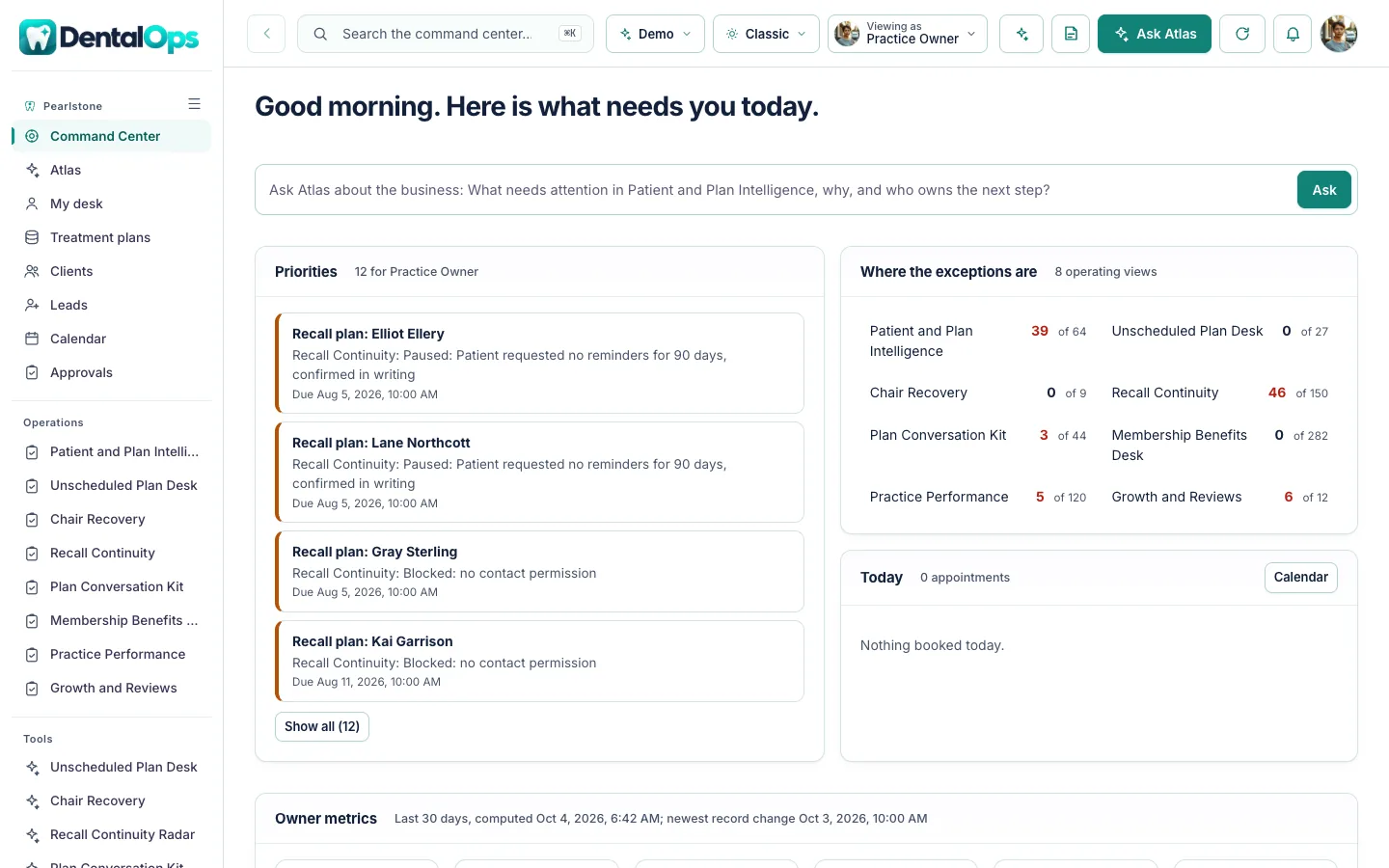
Opens the command center already signed in as the Practice Owner.
Open the demo ↗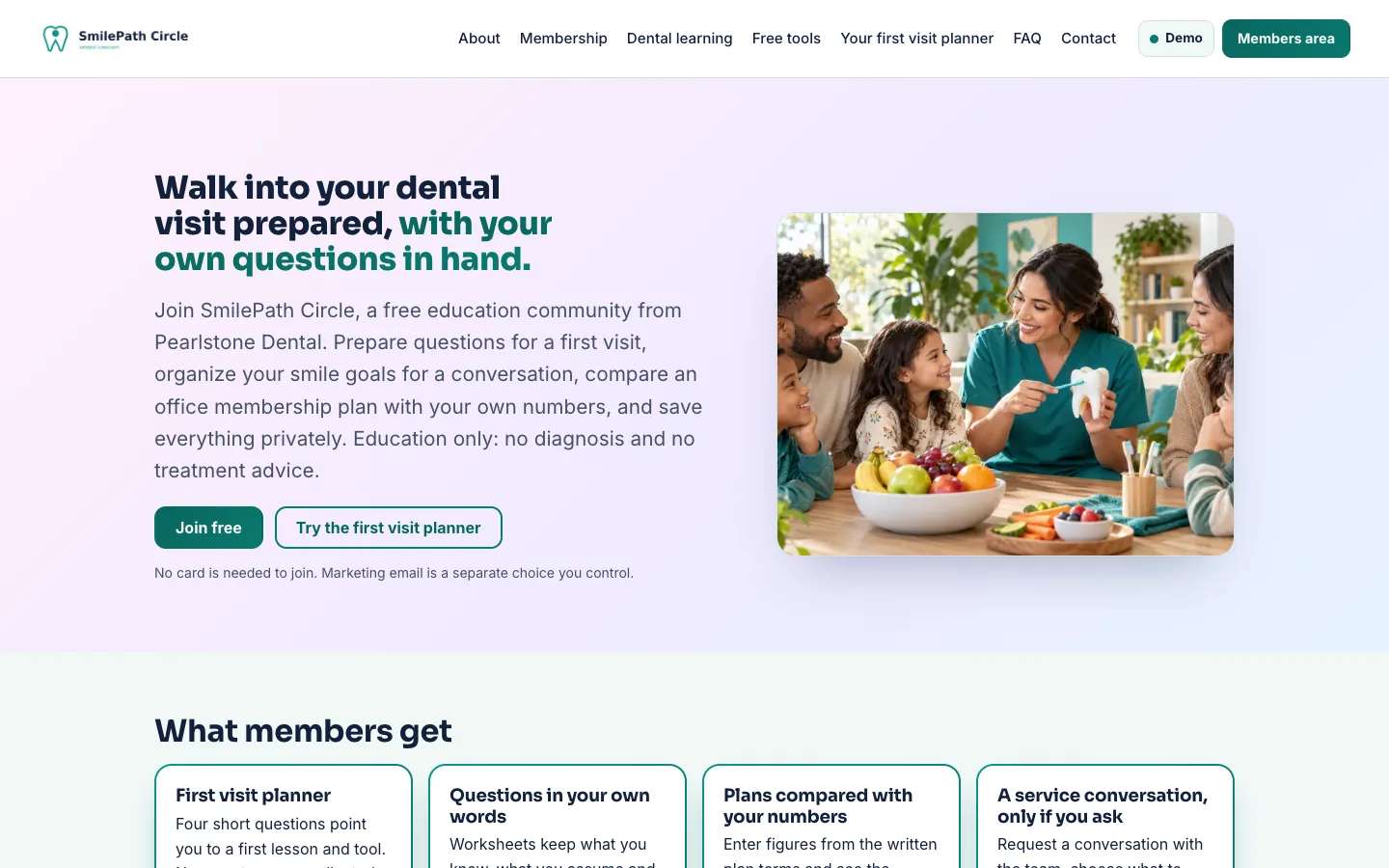
Opens SmilePath Circle, the Pearlstone Dental’s member community, as a member.
Open the demo ↗Each row shows what works today. Native features are built in; the other connections are simulated, imported or planned until we connect and test them in your scope. The Integrations screen shows each connection’s real state.
Native: built in and tested in the demo. Demo: sample or simulated behavior only. Planned: designed, not built.
A 15-minute walkthrough with your business in mind.
Workflows, users, connections and outside platform costs, in writing, before you commit.
Your brand, vocabulary, roles and the connections in scope, on your own private copy.
We confirm the schedule once we know your systems.
The AI Command Center core plan is $497/month with an agreed initial scope. Your proposal lists what is included (systems, users, automations, AI usage, hosting, support and onboarding) and any outside platform costs before you commit. The DentalCircle member platform and any complex connections are quoted with your scope.
Yes. Every customer gets its own private copy of DentalOps: its own code, server and database, holding only its own data.
Yes. Your logo, colors, company name and vocabulary. Your team sees your brand, not ours.
No. Pearlstone Dental is a fictional company and its records are sample data. DentalOps shows how your practice's own schedule, plans and recall would look.
No. It helps staff with scheduling, follow-up and administrative questions. Clinicians decide diagnosis and treatment, and ATLAS never recommends one.
Yes. DentalOps is sold as a complete set: the command center, the DentalCircle member community, the company website and ATLAS. DentalCircle can also run on its own.
No. ATLAS drafts and suggests. A person reviews and approves anything that goes out or changes a record.
It depends on your users, workflows and connections. Book a live demo and we will scope it with you; your proposal lists what is included and any outside platform costs before you commit.

Book a 15-minute live demo. We will walk through DentalOps with your schedule, team and recall process in mind, and agree what a first scope could look like.
The same proven foundation, shaped for other industries. Not in one of them? We build yours.
 Scheduling, intake and referral loops, for health practices.Explore HealthOps →
 Scope, change orders and budgets in one cockpit, for builders.Explore BuildOps →
 Households, listings and offers in one cockpit, for brokerages.Explore EstateOps →
 Every dispute, every client, one command center, for credit repair companies.Explore CreditOps →
 Trials, retention and class capacity, for gyms and studios.Explore FitnessOps →
 Intake, conflicts, matters and deadlines, for law firms.Explore LegalOps →