Open the exact vehicle
A tracked link or QR code takes the shopper to the truck that caught their attention, or into a make, model and trim search.
Turn a truck listing or inventory search into a lead with the exact vehicle, the buyer’s context and a booked visit. Give your sales team the next move.
Your inventory. Your buyers. One connected path from listing to booked visit.
A tracked link or QR code takes the shopper to the truck that caught their attention, or into a make, model and trim search.
A short, optional flow captures timing, a trade and payoff status, a down-payment range and the best way to reach them.
The shopper picks an available sample time or asks the dealership to contact them first.
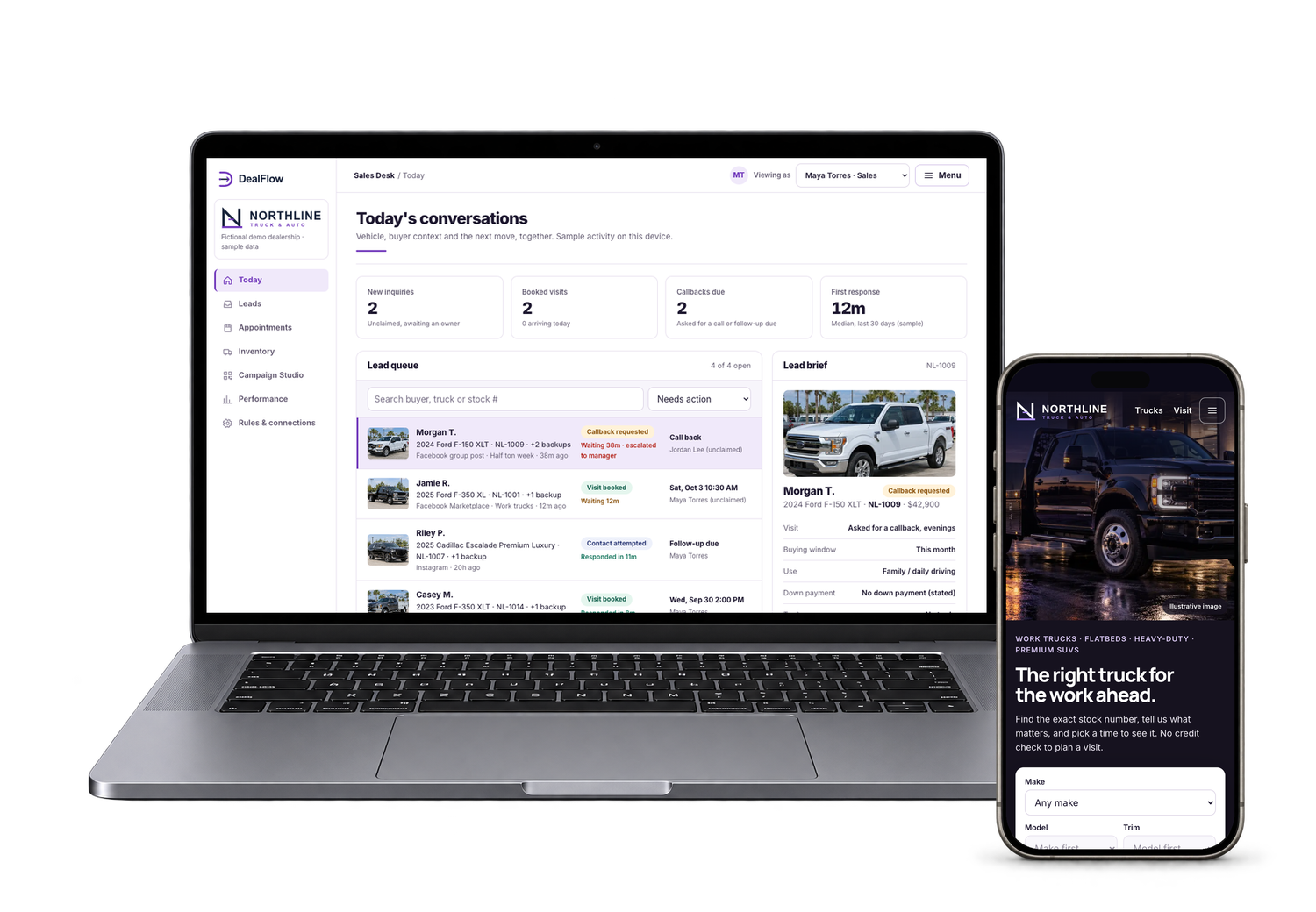
The Sales Desk shows the vehicle, source, answers, appointment and next action together.
A shopper messages about “the truck” and the team has to work out which stock number, which listing and which salesperson.
Timing, trade, payoff and down payment are asked again on the phone, and ready buyers wait while the basics are collected.
It is hard to tell which listings turn into conversations, visits and recorded sales, and who owns the next follow-up.
Buyers land on the selected vehicle or search make, model and trim across work trucks and premium stock. They answer only what they want to share and choose a time that works.
Cascading filters, equipment and axle options, chips and counts.
Choose Ford, then F-150, then a trim.
See it live (opens in a new tab)Paid off or still owed, recorded as shopper-provided context.
Plan my visit, then continue to the trade step.
See it live (opens in a new tab)Make, model and trim search, exact-vehicle entry, sold-stock alternatives and a callback option when a buyer is not ready to pick a time.

Give the right salesperson a useful brief. Keep the vehicle, source, appointment and permitted contact method visible as the conversation moves forward.

New inquiries, booked visits and callbacks due, with the lead brief beside the queue.
Open the Sales Desk.
See it live (opens in a new tab)Vehicle, source, timing, trade, down payment and permissions in one view.
Open the Sales Desk, then choose a lead.
See it live (opens in a new tab)The brief arrives with the vehicle and the buyer’s answers, so the first reply can confirm a time instead of starting from zero.
Tracked links carry the listing, campaign and original salesperson through search, booking and follow-up.
Compare listing opens, inquiries, bookings and staff-recorded visits by vehicle, campaign and rep, with the denominators shown.
These are opportunities to test, not promised sales or profit results.
Actual captures from the live demo. Enlarge any image, then use its live link and short instructions to explore the same area.
Buyers start searching the inventory straight from the home page.
Open the home page, then use Find your truck.
See it live (opens in a new tab)A tracked link opens the stock the buyer saw, with its source attached.
Open the link, then choose Plan my visit.
See it live (opens in a new tab)Monthly range and down payment help prepare the talk. Nothing blocks booking.
Continue to step 4, or skip it.
See it live (opens in a new tab)Sample slots in Eastern Time, or a callback request instead.
Continue to step 5 and choose a time.
See it live (opens in a new tab)The vehicle, the time and the next step together. Demo data stays on this device.
Finish the request to see the confirmation.
See it live (opens in a new tab)A sold truck cannot be booked; similar available vehicles are shown.
Open a sold vehicle from the demo guide.
See it live (opens in a new tab)Upcoming visits and follow-ups with reschedule and prepare actions.
Open Appointments.
See it live (opens in a new tab)Campaign Studio builds the full link, a scannable QR and listing graphics.
Open Campaign Studio and pick a vehicle.
See it live (opens in a new tab)Funnel stages by vehicle, campaign and rep, with denominators shown.
Open Performance.
See it live (opens in a new tab)Start with the demo guide to follow a buyer from a listing to a booked visit, then switch to the Sales Desk.
Demo data is saved in your own browser. Reset demo returns it to the starting sample.
These are the demonstrated workflows and customization areas. Your proposal defines what ships in your production version.
Each shopper starts with the vehicle and listing that brought them in. Sold stock shows similar available alternatives instead of a booking.
Cascading search across work trucks and premium vehicles, with equipment, rear axle, condition, price, mileage and availability filters.
Timing, trade and payoff status and a down-payment range are shopper-provided context. No credit pull and no approval promise.
Ready buyers pick a sample time; researching buyers ask for a call. Both reach the desk as leads with an owner.
Claim, route, note, reschedule, prepare the vehicle and record visited, sold or lost, with the history kept.
A tracked link, a scannable QR code and square and portrait listing graphics for each vehicle and salesperson.
Listing opens to recorded sales, segmented by vehicle, campaign and rep, with honest denominators.
Your identity, authorized inventory feed and photos, stores, hours, sales roles and agreed integrations.
Agree the starting point before launch, then compare real use and outcomes. Keep app activity separate from recorded sales.

Funnel stages by vehicle, campaign and rep, with denominators shown.
See it live (opens in a new tab)
Start with a working foundation and put the budget into the changes that matter to your buyers and sales team.
Dealership name, logo, colors, photography and language that feel like your store.
An authorized inventory feed, stores, hours, sales roles and the routing rules agreed in your scope.
We assess calendar, CRM, messaging, listing tools and finance hand-off against the systems you actually use.
Your quote separates build work, ongoing services and third-party costs. A focused version can sometimes launch within a week once scope, content and access are ready. Inventory feeds and integrations take longer.
The demo proves the buyer route, lead brief, staff workflow, campaign assets and reporting on sample data. It does not post to Facebook Marketplace, sync a dealer calendar or CRM, submit finance applications or pull credit.
We confirm inventory ownership and photo rights, security, data handling and third-party access before promising a connection. Finance applications and identity documents stay in the dealership’s approved secure system.
The demo creates tracked links and listing assets. Posting is a separate workflow. We would assess an approved listing tool and its available integration before scoping automation.
No. The optional questions prepare a sales conversation. A credit application and any credit check belong in the dealership’s approved secure finance process.
Yes. Every budget question is optional and no answer blocks a visit or a callback request.
Yes, after we review your inventory feed, photo rights, locations, roles, routing rules and system access. The public demo uses 37 fictional vehicles.
The demo uses sample slots saved in the browser. A production calendar connection needs your approved provider, access and booking rules.
Yes. The buyer journey is designed for phones. The Sales Desk adapts for tablet and desktop.
We quote the workflows, branding, inventory and connections you actually need. Book a demo for a scoped proposal rather than a generic price promise.

See the working demo. Then tell us how your dealership works.
Eighteen ways to imagine your own business app, with customer journeys and staff workspaces you can explore.
Explore all 18 appsDealFlow is shown with Northline Truck & Auto, a fictional dealership, and sample data.