Start where the guest is
A hole-specific QR link opens the drinks experience with location context. Guests enter their name and customer number.
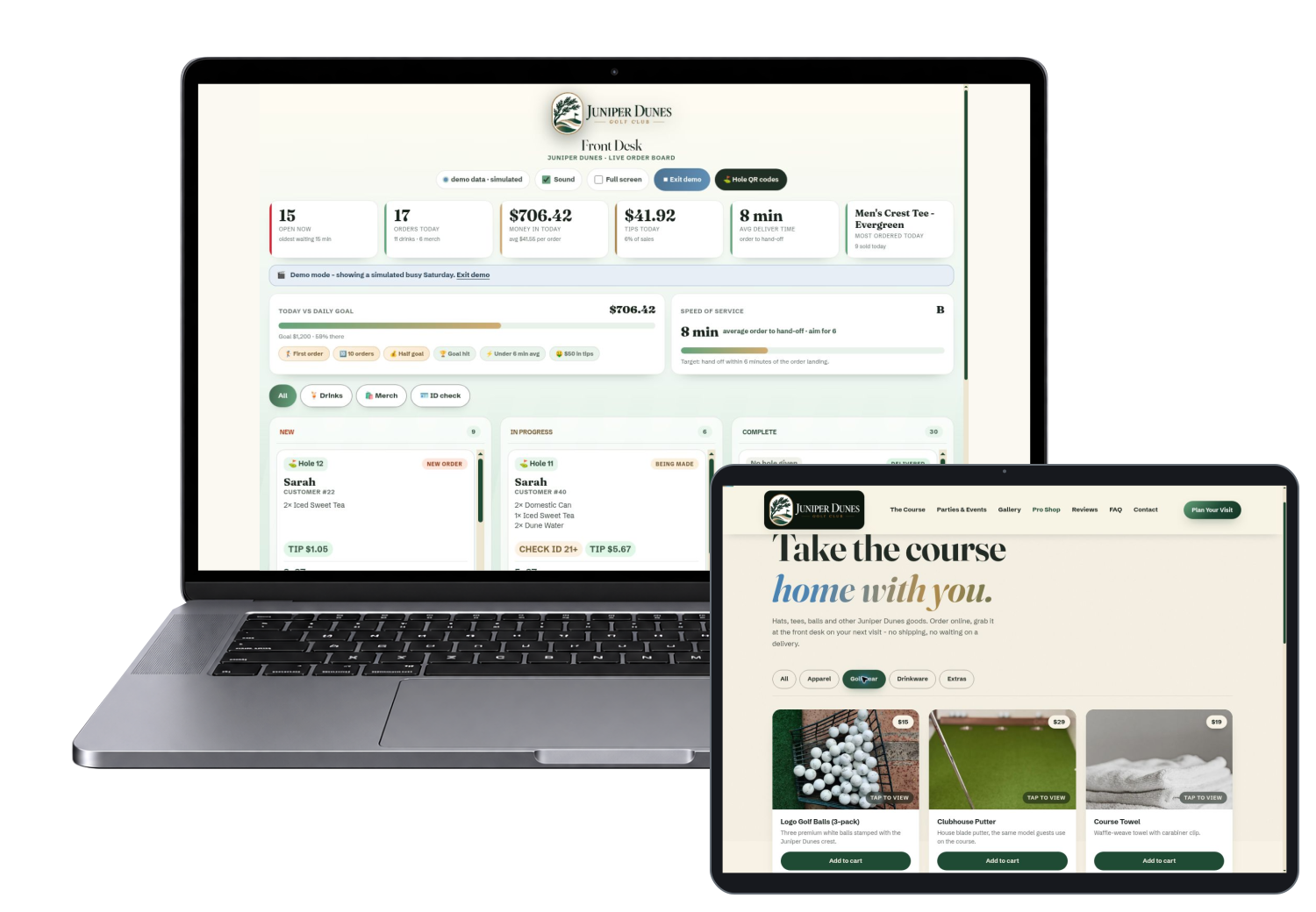
Give guests your own golf experience app. They can order refreshments from their hole, browse your pro shop and plan a visit while your team manages incoming requests from one front-desk board.
For putting courses, golf entertainment venues and custom golf hospitality workflows.
A hole-specific QR link opens the drinks experience with location context. Guests enter their name and customer number.
Browse the menu and review the order. The demo also includes a separate pro shop with front-desk pickup.
Drink and merchandise orders reach the staff board with the context and status needed to organize service.
Let guests browse refreshments where they are playing, instead of depending on another trip to the clubhouse.
Hole and customer details help staff understand where a request belongs. This is explicit location input, not GPS tracking.
Keep the pro shop available on guests’ phones and give purchases a clear pickup destination.
The demo shows the journey. Your version carries your brand, products and service rules.
Guests can adjust a selection before checkout.
Choose Soft Drinks & More, then Fresh Lemonade.
See it live (opens in a new tab)The cart shows selected products and the pickup checkout path.
Add an item, then open the cart. No purchase is required to inspect it.
See it live (opens in a new tab)For putting courses, golf entertainment venues and custom golf hospitality workflows.

Show the team what needs attention, with the context to respond.
Simulated busy-day orders show how the staff view organizes work.
Choose Preview busy day if not already in simulated mode.
See it live (opens in a new tab)Printable QR signs create an entry point for the ordering journey.
Open the QR sign sheet.
See it live (opens in a new tab)Bring the menu into the guest experience while the intent is there. Measure completed orders rather than assuming every scan creates revenue.
A branded pro shop lets guests discover course products beyond the physical counter.
A common order board helps the team see incoming work, statuses and notes. Actual delivery still depends on your staffing and operating process.
These are opportunities to test, not promised revenue or profit results.
Actual captures from the live demo. Enlarge any image, then use its live link and short instructions to explore the same area.
Guests enter a name and customer number before opening the menu.
Enter any first name and use the keypad for a customer number.
See it live (opens in a new tab)Browse categories and displayed prices before choosing.
Enter guest details, then See the menu.
See it live (opens in a new tab)Browse merchandise categories for course pickup.
Choose Golf Gear.
See it live (opens in a new tab)A larger product image helps guests evaluate an item.
Choose Golf Gear, then the golf-ball product image.
See it live (opens in a new tab)The chooser explains guest, shop and staff views plus current scope.
Choose the view you want to explore.
See it live (opens in a new tab)Guests can explore what the putting venue offers.
Open the course page.
See it live (opens in a new tab)A dedicated page introduces parties and event inquiries.
Open Parties & Events.
See it live (opens in a new tab)Visit information connects discovery to the venue experience.
Open Plan Your Visit.
See it live (opens in a new tab)The venue website introduces the guest experience.
Open the guest home page.
See it live (opens in a new tab)Start with the demo chooser to explore the guest and staff views.
The checkout is in demo mode. The simulated busy-day board is labeled inside the app.
These are the demonstrated workflows and customization areas. Your proposal defines what ships in your production version.
Hole-specific entry links and customer numbers give the service team useful handoff context.
Let guests browse cocktails, other drinks and family-friendly options with clear displayed prices.
Guests review selections and tip options. The current checkout is a demo and does not charge a card.
Show apparel and golf products, inspect product imagery and build a pickup basket.
The staff view displays drink and shop work with statuses and notes. A clearly labeled simulated busy-day view demonstrates the flow.
Give each hole an entry point guests can scan. QR signage is configured for the venue’s actual service rules.
Course, events and visit information give guests context before arrival. Event inquiry is not automatic booking.
Customize branding, products, service areas, fulfillment rules and agreed production connections.
Agree the starting point before launch, then compare real use and operating results. Keep app activity separate from actual business profit.
Start with a working foundation and put the budget into the changes that matter to your customers and team.
Business name, logo, colors, imagery and language that feel like your company.
Products, locations, stations or service areas, roles and the workflows agreed in your scope.
We assess booking, POS, payment and other integrations against the actual systems you use.
Your quote separates build work, ongoing services and third-party costs. A focused version can sometimes launch within a week once scope, content and access are ready. Larger catalogs and integrations take longer.
The current product demonstrates guest ordering, pro-shop pickup and the staff board. Tee-time booking, loyalty and a multi-venue dashboard are planned, not live features.
We confirm production security, access, data handling, fulfillment and integrations before launch. The public demo is a sales example, not your production environment.
TeePilot is positioned for golf hospitality across putting courses and traditional venues. The live Juniper Dunes example is an 18-hole putting course. We scope routing, service areas and operating rules for your course.
No. Tee-time booking, loyalty and a multi-venue dashboard are marked as planned in the current demo. They require additional implementation and are not sold as live features on this page.
The demo states that checkout runs in demo mode and no card is charged. Production payment setup is a separate, verified integration step.
The demo includes a pro shop, product imagery, a basket and a front-desk pickup flow. Your real products, availability, taxes and payment setup must be configured before production.
No. The demonstrated flow uses a hole link and customer details, not live GPS tracking. Guests and staff need a clear delivery process.
We quote the workflows, branding, data and connections you actually need. Reusing a working foundation can reduce development work. Book a demo for a scoped proposal rather than a generic price promise.
Yes. The software product name and the fictional demo business are different layers. Your customer-facing version is tailored to your business identity and agreed guest journey.

Let’s design the guest journey and staff workflow around the way your course actually runs.
Eighteen ways to imagine your own business app, with guest journeys and staff workspaces you can explore.
Explore all 18 appsTeePilot is shown with Juniper Dunes Golf Club, a fictional business, and sample data.