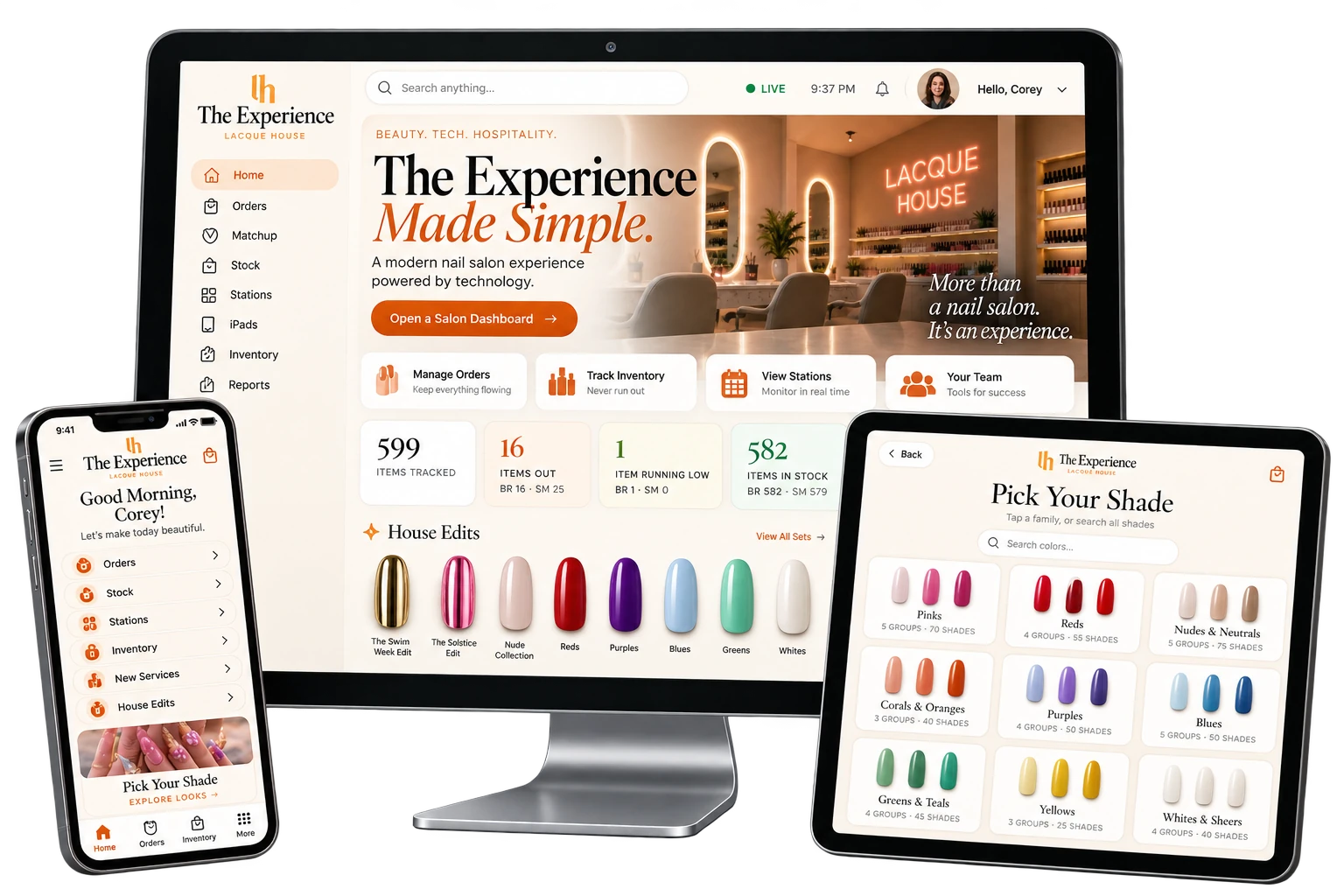
This is not a website redesign - Lacque House's marketing site is its own separate case study. This is the app running inside both of Carolina Rubi's Miami salons: 21 iPads across Brickell and South Miami let guests order a drink, browse 600 nail shades, pick curated nail art and request add-on services from their seat, while a live dashboard shows the owner and front desk both locations at once.
There was no old app to replace, so this case study is not a before-and-after of the same system. It is what was missing before this one existed, and what is measurably true now that it is running in both locations.
Ordering a drink or asking about an add-on meant flagging down a staff member who was usually already with another guest.
Choosing a shade meant a physical binder or wall display - not searchable, not tied to what was actually in stock that day.
Two locations meant two separate operations. There was no single screen showing orders, stock or device health across both at once.
With hardware at 21 individual stations, there was no automatic way to know if one had gone dark until a guest or staffer noticed.
Knowing what was low or out at a given location meant a physical count, not a live number checked before a guest ever asked for it.
There was no record of which colors or drinks guests actually wanted most, at either location.
These are not opinions - each row on the right was fetched directly from the live app's own data while writing this page: its color catalog, its inventory API, its device-status API and its usage-stats API.
Every figure above was fetched from the live app's own APIs and screens while writing this case study, not estimated. See the sections below for the screenshots each one comes from.
Every station runs the same app, personalized to that seat - "We'll bring it to Station 4," the confirmation says. Tap any screen below to see the actual capture full size.
A real screen recording, not a mockup - home, Pick Your Shade, a color family and a shade detail, captured live on the app.
Every order, every stock count and every device's status feeds one owner view that can show both locations together or either one alone - the same data the front-desk staff at each salon works from during a shift.
Screenshots only - the owner's front desk and inventory screens are never embedded live on this page. See the "Built For The Business" section below to view any of them full size.
Every feature below runs on hardware already mounted at the station - nothing to download, nothing to log into.
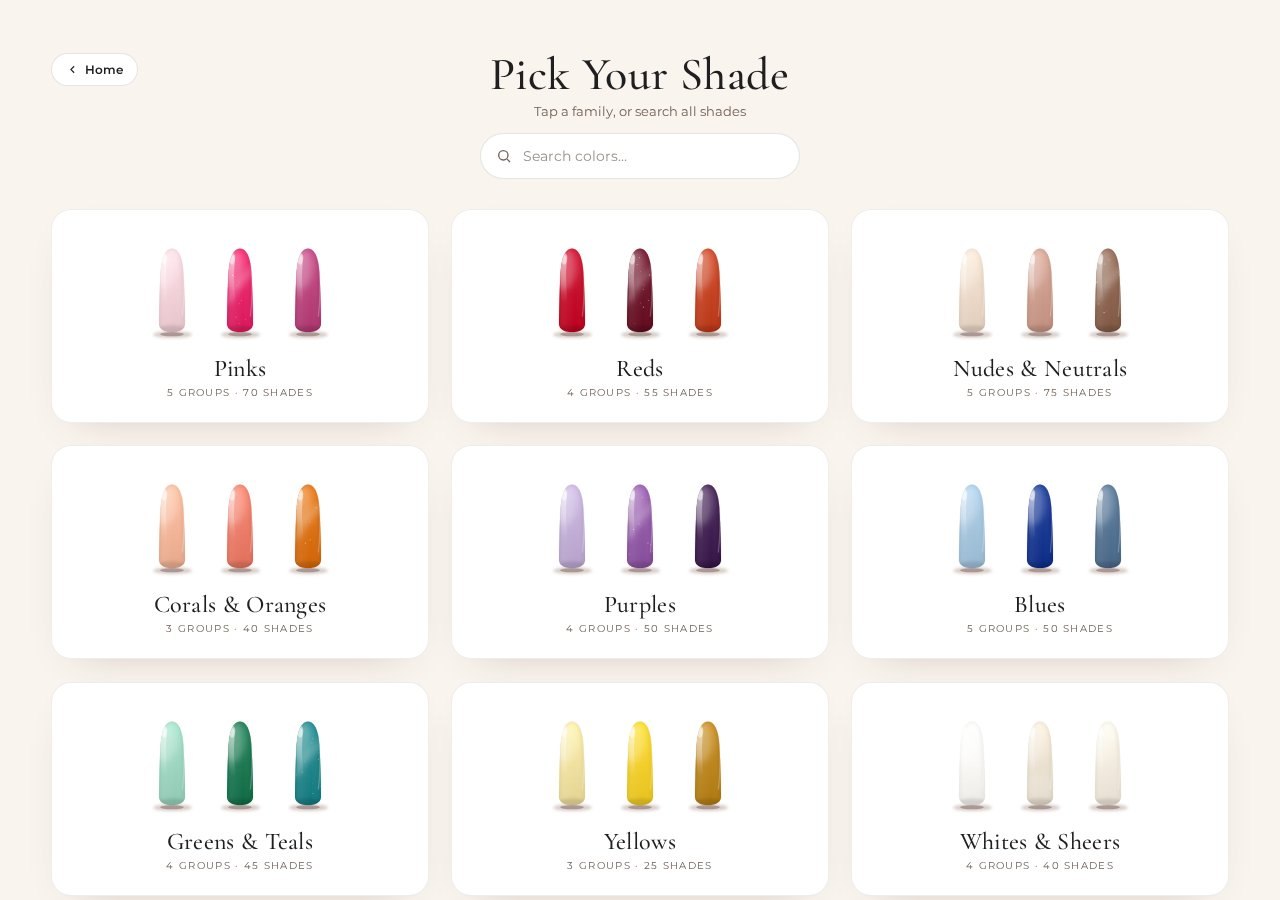
Pinks, Reds, Nudes & Neutrals, Chromes & Metallics and 10 more families, each with a shade count and a search box. A guest can browse a family or search all 600 by name - and every shade shown is checked against that location's real stock, not a static catalog.
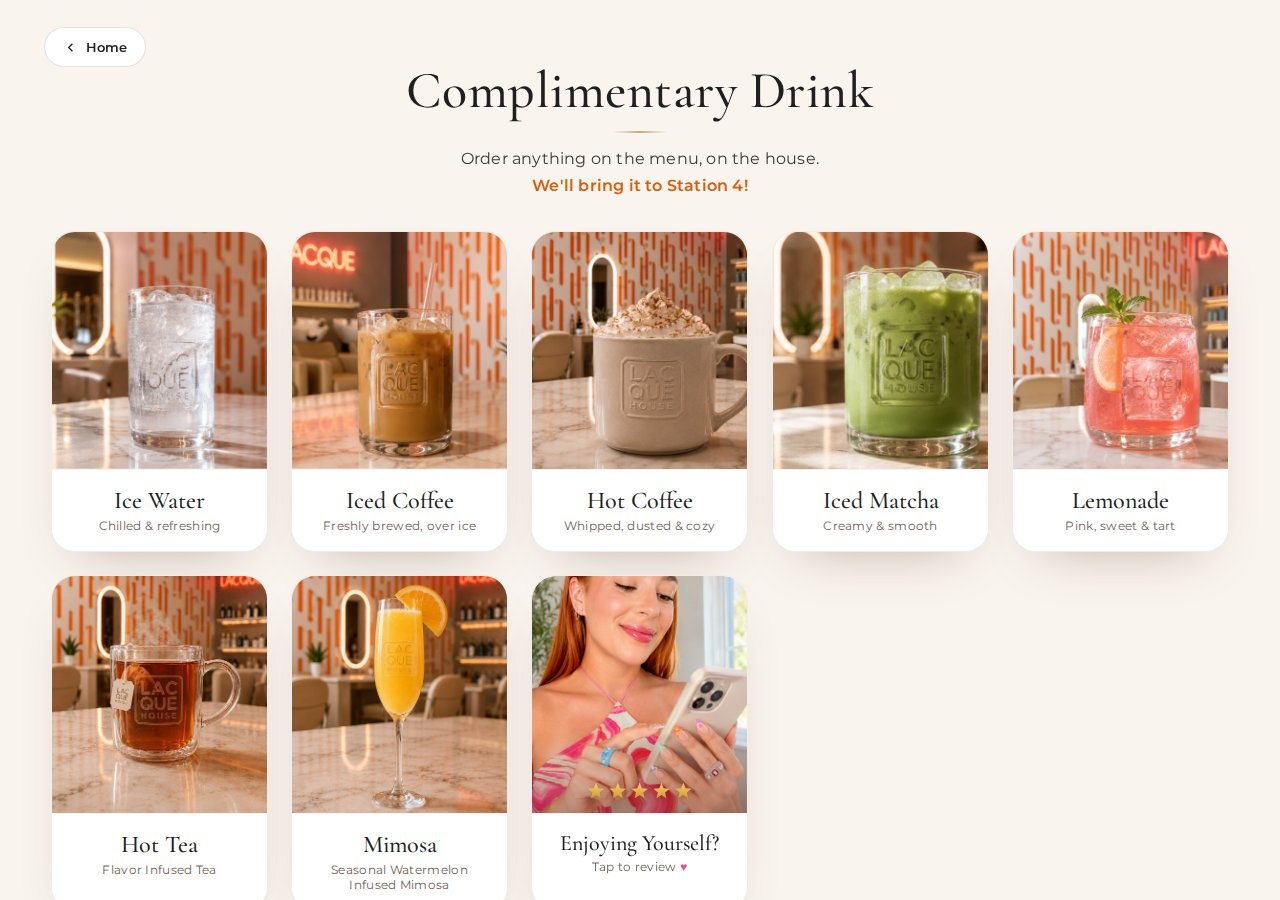
7 drinks - ice water, iced and hot coffee, matcha, lemonade, tea and a seasonal mimosa. Four let a guest choose milk, sweetener and flavor before it ever leaves the counter.
House Edits group designs into themed sets - The Swim Week Edit, The Solstice Edit and more - each with its own shade names and a "show all designs" expansion.
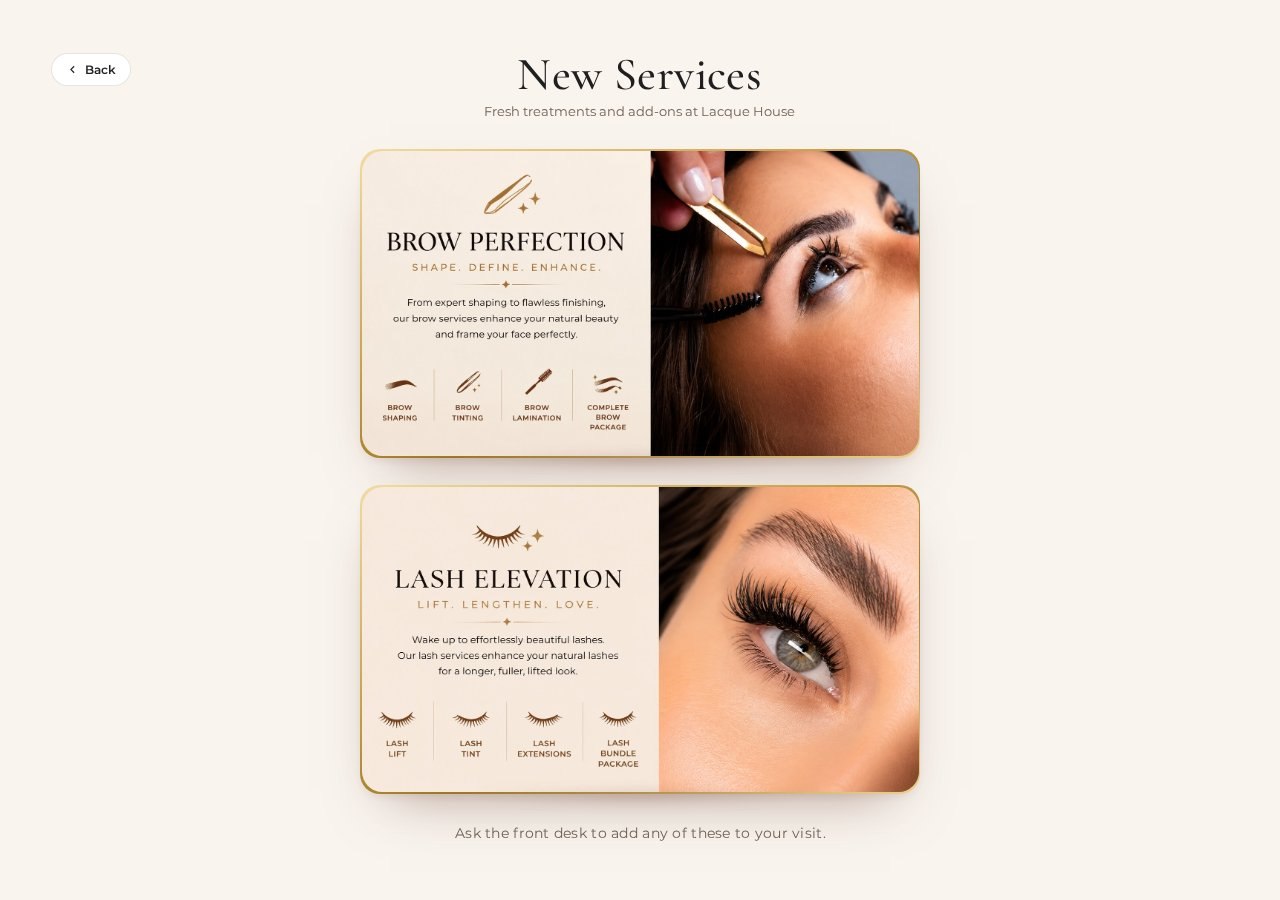
The New Services screen shows Brow Perfection and Lash Elevation, 4 options each, ending with "ask the front desk to add any of these to your visit" - an upsell that sells itself.
The drink confirmation names the actual station - "We'll bring it to Station 4!" - so an order never gets delivered to the wrong chair.
"Rate Us" sits on the home screen next to ordering, not buried in a follow-up text days later.
Brickell and South Miami both run the identical experience, so a regular guest gets the same iPad ordering flow at either location.
Twenty-one iPads across two locations are only as useful as the system watching them. Here is what runs underneath, and what each screen is for.
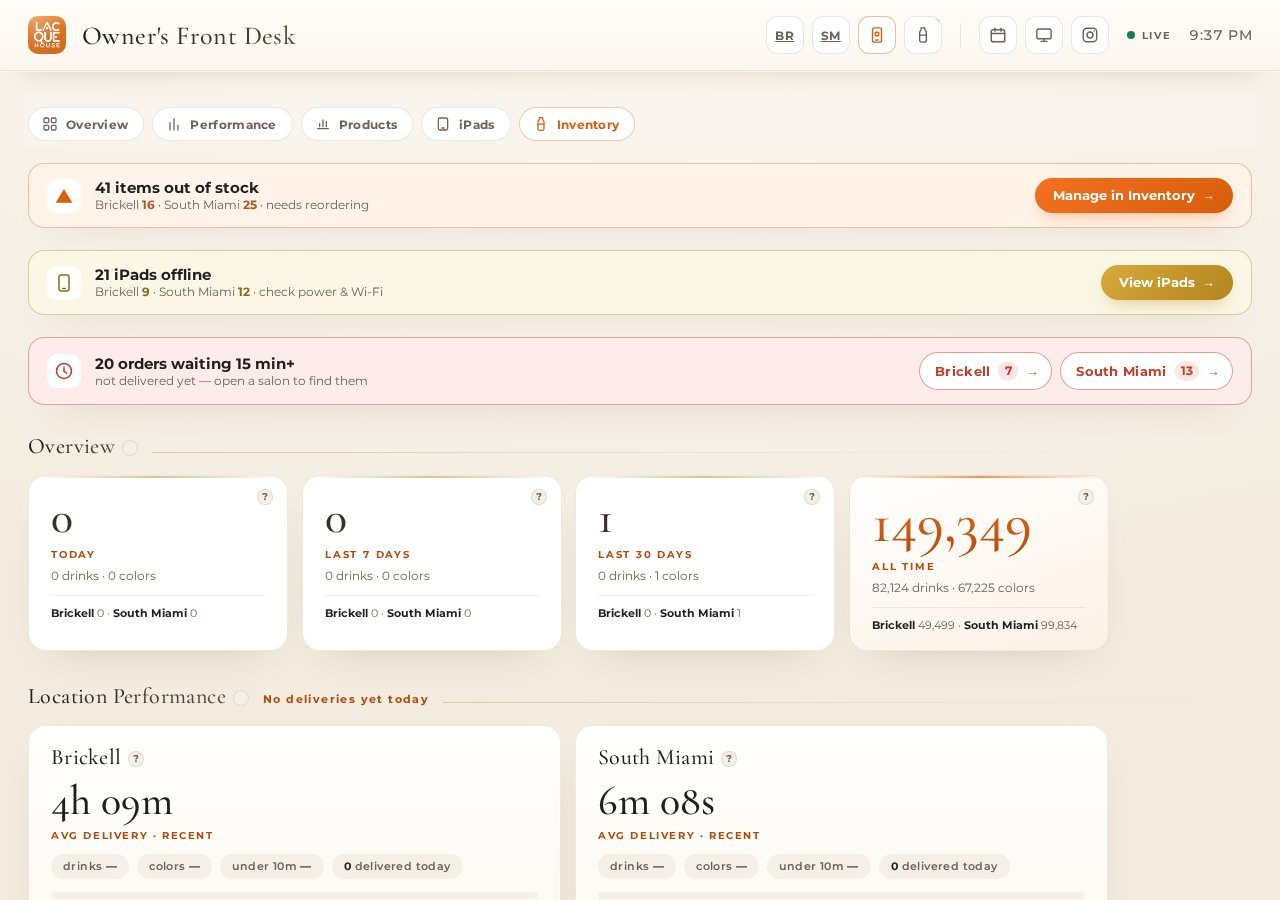
The Owner's Front Desk overview flags what needs attention first - items out of stock, iPads offline, orders waiting too long - then breaks all-time usage down by location. At the time of writing it showed 149,349 lifetime taps, 41 items out of stock and 21 offline devices, live.
Every order shows its station, how long it has waited, and an "item out of stock?" prompt staff can flag in one tap.
1,203 tracked line items across both locations. A shade hides itself from the iPads automatically the moment it reaches zero - no manual delisting.
All 21 stations listed by salon and number, flagged offline after 25 minutes idle - "usually it's asleep, closed, or off Wi-Fi," not necessarily broken.
Average delivery time is tracked per location side by side - a built-in nudge for whichever team is running slower that day.
A new iPad picks its salon and station number from an on-screen wizard, and front-desk or owner displays add themselves the same way.
A dedicated walkthrough page greets Carolina by name and explains every piece in plain language - what it does, and what she still needs to send over.
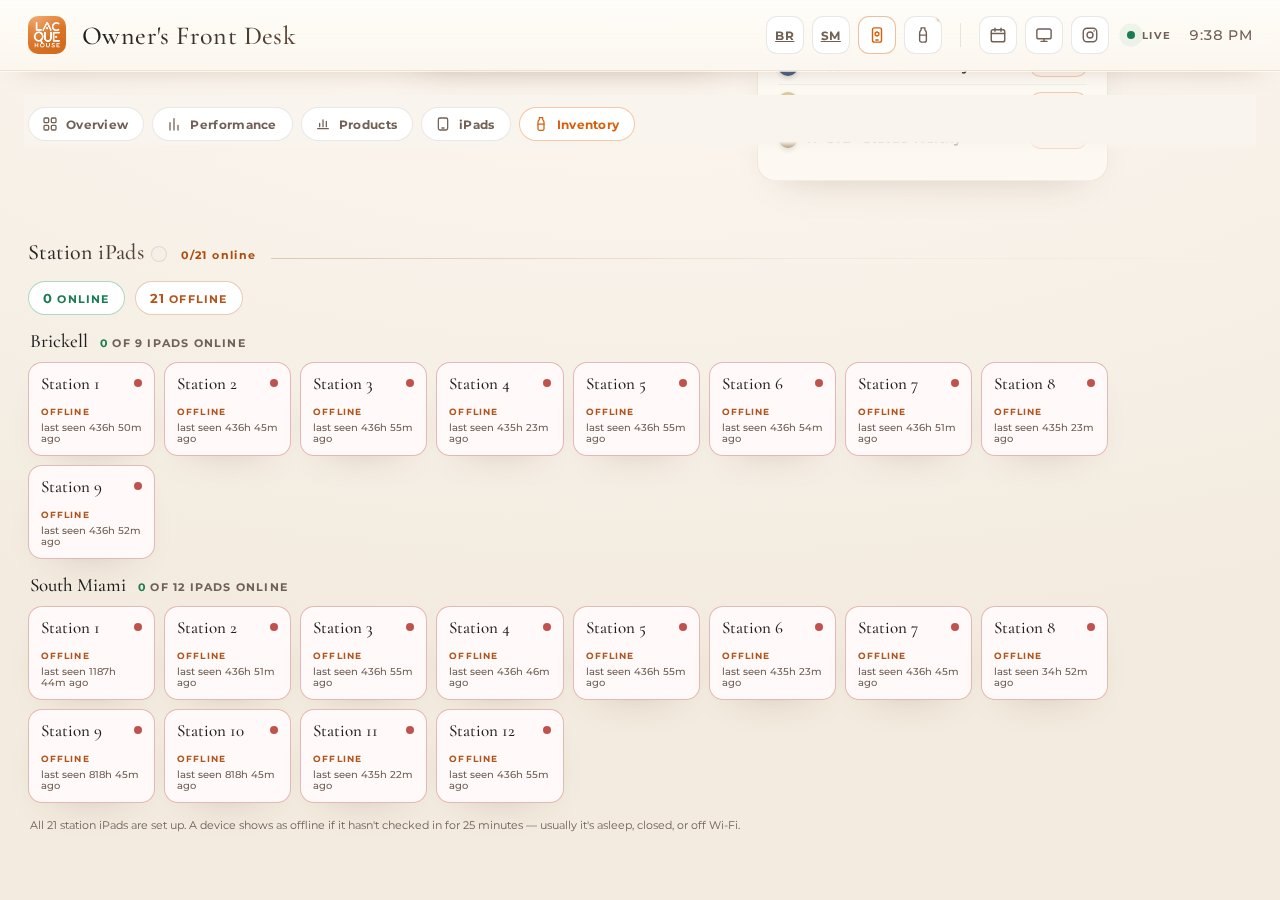
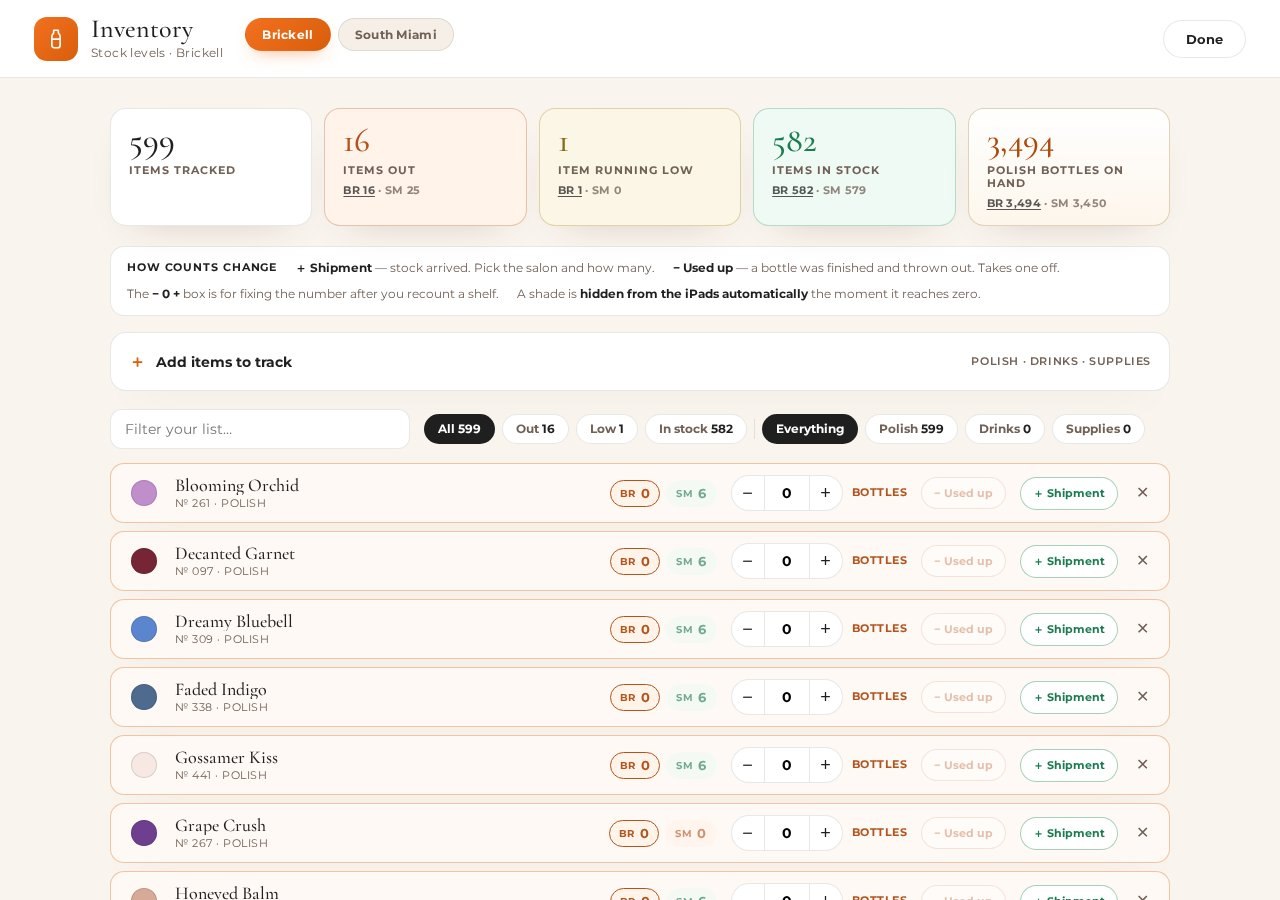
These are real captures, scrolled automatically so you can see the full page - never a live embed of the working app, by design.
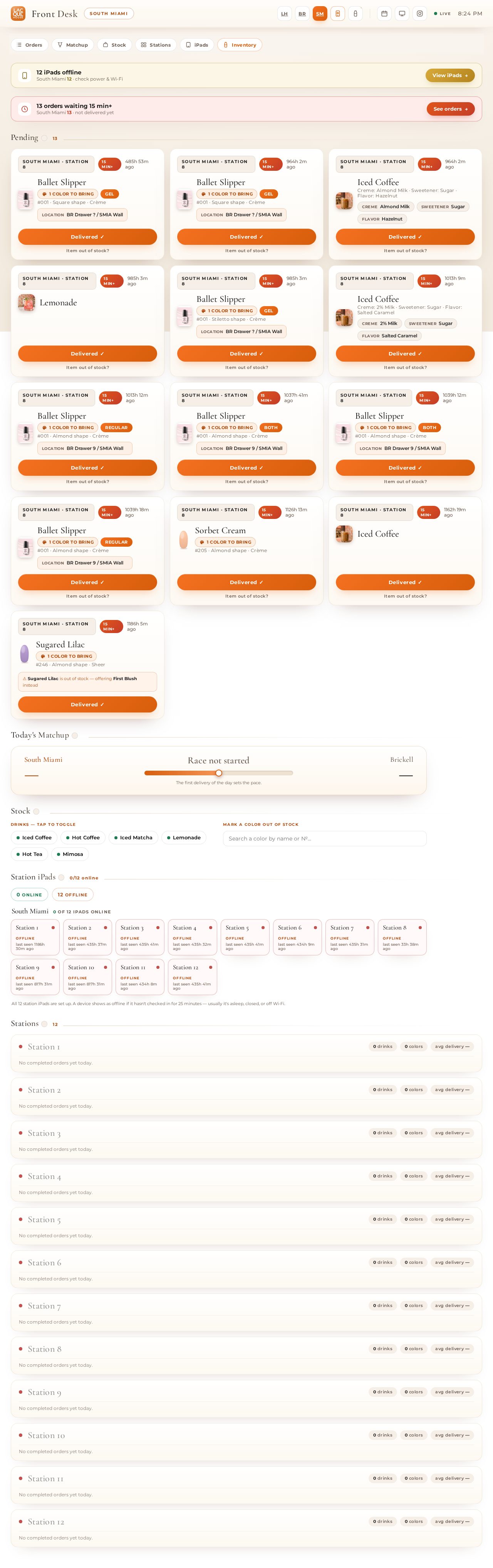
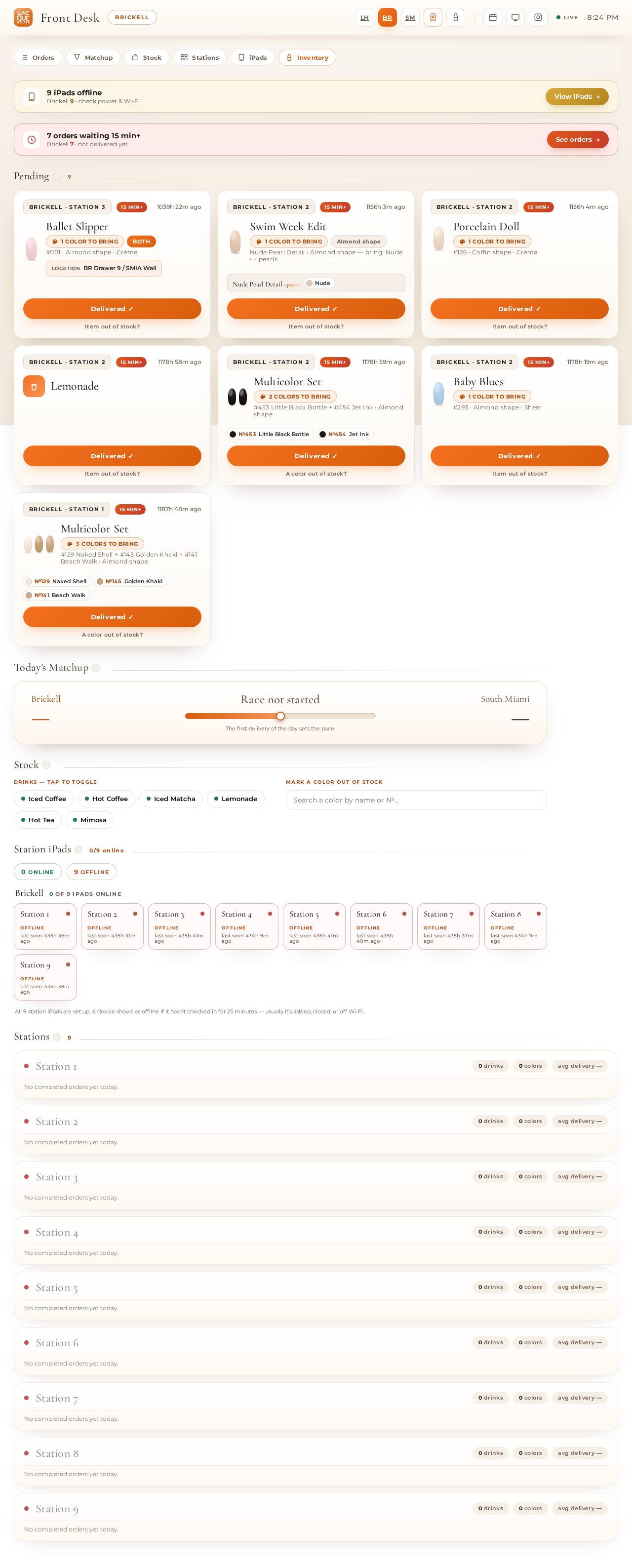
Both captures above are real, full-page screenshots of the live order queue - auto-scrolled here so the whole page is visible without a live embed.
A tablet on a counter isn't technology by itself - the system keeping 21 of them in sync, current and self-reporting is. Here is what a guest sees against what is actually running behind it, confirmed by fetching the app's own live endpoints while writing this page.
Twenty-one iPads isn't a feature.
Twenty-one iPads that report their own health is.
We don't publish sales or booking numbers here - a tap count is not a sale. We publish what the app itself can prove, and nothing more.
Here is everything actually delivered, in one list.
Drinks, color browsing, House Edits and add-on prompts, running identically at both locations.
14 searchable families, tied to real per-location stock, not a static list.
A dedicated queue for Brickell, one for South Miami, and a combined owner view over both.
1,203 tracked items with auto-hide at zero stock and low-stock flags.
Live status for all 21 iPads with an automatic offline rule.
Average delivery time and volume compared side by side between salons.
Any iPad configures itself as a station, front desk or owner display in two taps.
A walkthrough page explaining every piece of the system in plain language, addressed to Carolina by name.
Every card below opens the real screenshot for that part of the app - no live links, so nothing operational is ever exposed on this page.
Each card opens the real screenshot in a full-size viewer - the same views staff and the owner use every day.
Unlike a pre-launch redesign, this app is live and in daily use at both locations. Here is what is finished and verified - no made-up traffic or booking numbers.
Every figure in this case study comes from the live app as installed in both salons - not a demo, a staged preview, or a mockup. The only thing we don't publish is anything about bookings or revenue, because a tap count is not a sales number, and we only publish what we can measure directly.
No way for a guest to self-order
A binder for 600 possible colors
No single view across two locations
No idea if a station iPad was even on
Inventory tracked by hand
No usage data at all
21 iPads ordering drinks, colors and nail art
600 shades, searchable, tied to real stock
One owner view over both salons
Live device status for all 21 stations
1,203 inventory items tracked to the bottle
149,349 lifetime taps logged automatically
A guest-ordering kiosk system, a device-fleet monitor for 21 tablets, and a live multi-location owner dashboard are usually three separate vendors and three separate bills, each with its own login and its own monthly fee. We didn't publish a specific build price for this case study - every business's station count and integrations are different, which is exactly why we price each build individually rather than off a menu.
Three vendors, three logins, three bills
Custom kiosk / ordering software
A separate device-fleet management tool
Custom dashboard development
Integration work to connect all three
Hosting for each piece separately
A support contract for each vendor
One relationship, one system, all of it included
Guest ordering, catalog and inventory in one build
Device fleet monitoring included, not a separate tool
Multi-location owner dashboard included
Hosting included
Unlimited edits - you text it, we ship it
Real human support by text
Every business's station count, menu and integrations are different, which is why this build was priced around Lacque House's two locations and 21 stations specifically. Text us your details and we'll price yours the same way.
How many stations or seats, how many locations, what you want a guest to be able to do without asking anyone. That's the whole assignment.
Guest-facing ordering, a catalog or menu, inventory, device monitoring and an owner dashboard - built around your business, not a template.
You review everything at a private link, exactly like this page, before it ever touches a real device on your floor.
The questions a business owner actually has before building something like this.
It is the in-salon system running on 21 iPads across Carolina Rubi's two Miami locations, Brickell and South Miami. Guests at each station order a complimentary drink, browse a 600-shade color catalog and curated nail art, and request add-on services, all from their seat. A separate front desk and owner view shows both locations' orders, inventory and device health live.
No. It runs in the browser on iPads already mounted at each station. There is nothing for a guest to install, sign into or carry with them.
Shades are organized into 14 families, Pinks through Cat Eye, each with a search box and swatch grid. A guest can browse by family or search all 600 by name. Every shade is tied to real inventory, so what is shown as available is checked against live stock, not a static list.
The inventory system hides a shade from the iPads automatically the moment it reaches zero at that location. At the time this case study was written, 16 shades were out at Brickell and 25 at South Miami out of roughly 600 tracked per location - a real, live number, not a hypothetical.
Yes. The menu has 7 drinks, including iced and hot coffee, matcha, tea and a seasonal mimosa. Four of the seven let a guest customize milk, sweetener and flavor, and the order routes straight to the front desk with the guest's station number attached.
Every order lands in a live queue at the front desk, tagged with the station, the location and how long it has been waiting. Orders sitting more than 15 minutes are flagged automatically so nothing quietly gets missed.
Both. A combined Owner's Front Desk view shows Brickell and South Miami side by side - orders, inventory and device status together - and each location also has its own dedicated desk view for staff working that shift.
Each of the 21 stations reports its own status to a live device API. A station is flagged offline if it has not checked in for 25 minutes, which usually means it is asleep, closed, or off Wi-Fi rather than actually broken - so staff get a real signal instead of a guess.
No. The pattern - guest-facing ordering and browsing on fixed tablets, plus a live owner and front-desk view across multiple locations - fits any business with stations, chairs or tables and more than one location to track: salons, medspas, restaurants, studios and similar.
A QR code menu is read-only and lives on a guest's own phone, disconnected from the business's systems. This runs on hardware the business owns, ties every order and color tap to live inventory, and feeds a real dashboard the front desk and owner actually use - not just a PDF a guest scrolls through.
No. Each iPad configures itself through a short on-screen wizard: pick the salon, pick the station number, done. The same setup page also has one-tap links for the two front-desk displays and the combined owner view.
A custom kiosk ordering system plus a device-fleet monitor plus a multi-location owner dashboard is usually three separate vendors and three separate bills. See the Math section above for what that typically involves - we did not publish a specific figure for this build because every business's station count and integrations are different, which is also why we price each one individually rather than off a menu.
Yes - every drink order and every color tap is logged automatically. As of this write-up the app had recorded 149,349 lifetime interactions across both locations, pulled directly from its own live stats API, not estimated.
No. We can build around whatever a business already has - menus, price lists, a logo - and fill gaps with a short conversation. A logo and a few real photos help, but a build can start without a finished brand kit.
14 of the questions we get asked most are echoed here - a different set than our other case studies, picked for this build.