Case Study · Website + Membership Platform
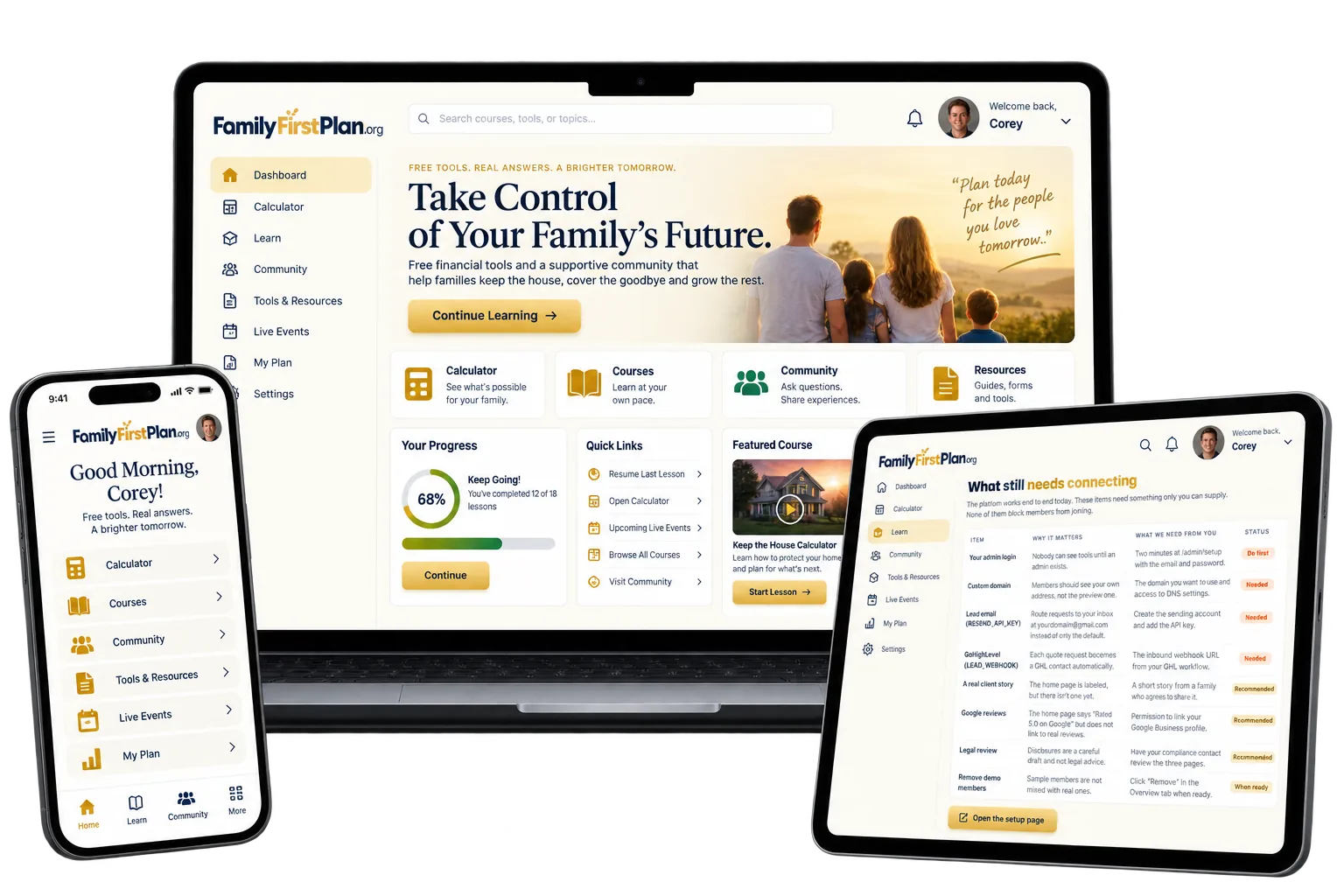
Sydney Troski is a licensed life and wealth strategist. She had no website at all. We built FamilyFirstPlan.org from nothing: three lead calculators, a free-for-life membership with courses, tools and a community, and a CRM back office where every lead lands.
The Starting Point
Sydney had no digital presence built for the way people actually decide to buy life insurance: quietly, over weeks, after doing their own math first. Here is what was missing before this build existed.
A family wondering if they could keep the house after a death had nowhere to go plug in their own numbers and see an answer.
Nothing built trust before a sales conversation - no courses, no tools, no reason to believe Sydney before ever talking to her.
Most people are not ready to buy the day they look. With nothing to return to, that interest just evaporated.
A brand-new domain with nothing published yet - invisible to Google, ChatGPT, or anyone asking an AI assistant for a recommendation.
No CRM, no pipeline, no way to see who was warm, who needed a call, or who had gone quiet.
Nothing on the internet established that Sydney is licensed in ten states with an active NPN - just a name people would have to take on faith.
The Build, Measured
With nothing before it, this build is judged on its own numbers - the same full technical audit we run on every site, tracked across the final round of fixes before this page was written.
Mobile QA covered 23 routes at 8 widths from 320px to 1920px with zero horizontal overflow and zero console errors.
What Was Built · The Public Site
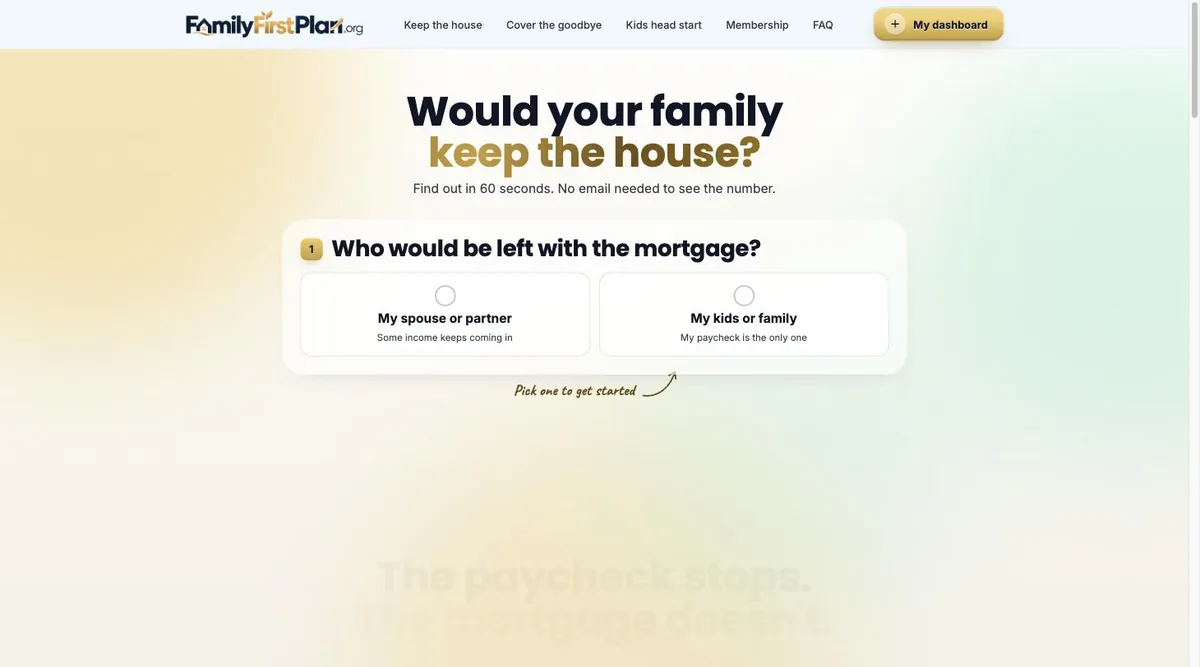
The public site is the lead magnet. A visitor answers one question about their family, gets a real number in 60 seconds with no email required, and every calculator run becomes a lead in the back office. Tap any page to see the actual screenshot full size.
Inside the Members Area
Anyone who runs a calculator can join free for life. Once inside, they land in a real membership: a dashboard that tracks a live savings goal, 14 courses with quizzes and certificates, 31 interactive tools, badges, levels, a leaderboard and a moderated community - all built to keep a lead coming back long after the first visit, instead of going cold.
9 distinct member templates in total - dashboard, community, courses, individual course lessons, tools, messages, badges, profile and certificates - plus direct messaging between members and Sydney. Only 6 are pictured above to keep this section readable; open the two lists above to see every course and every tool by name.
What a member actually gets
The free calculators are the front door, not the whole house. Here is everything behind them, and what each piece is for.
Keep the House, Cover the Goodbye and Head Start. Each takes about a minute and shows the number without asking for an email first - the point is to be useful before being introduced. Every saved plan gets its own link a family can pass to a partner, so the next visitor arrives already looking at a figure.
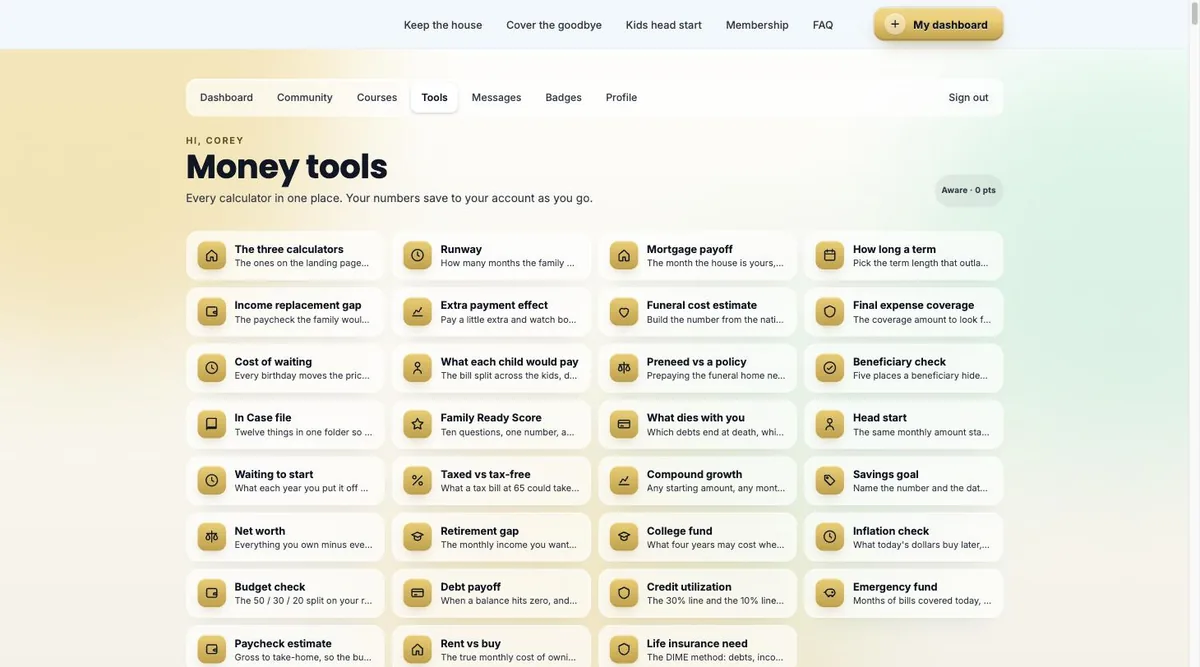
Calculators and planners linked from the lessons that need them, with what a member works out attached to their account so it is still there next visit.
Four to six lessons each with a five-question quiz and a printable certificate, written in plain language for a phone screen. 70 quiz questions in total.
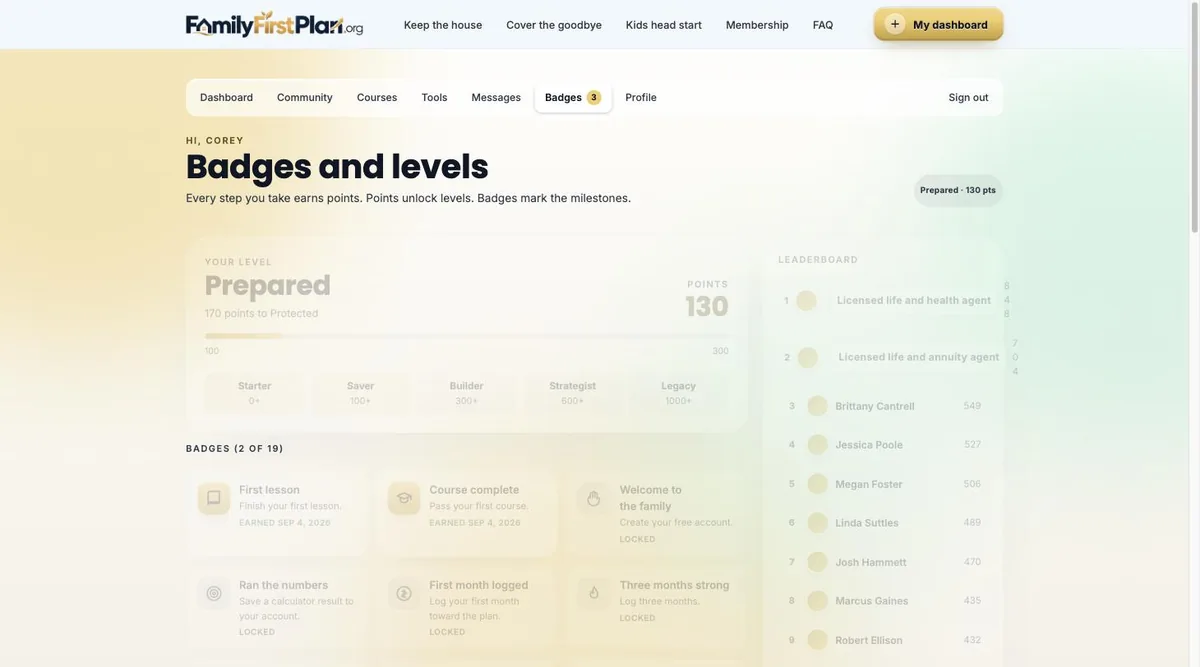
Driven by points and shown on a leaderboard, with a celebration on screen each time one unlocks.
Their saved numbers, where they are against them, and a one-tap way to keep it current.
Somewhere families ask what they would never post publicly, answered in the open so everyone else reading gets the benefit.
A direct line per member, and a way to reach everybody at once when something matters.
Every course finished produces something a member can actually keep - the small proof that turns a browse into progress.
The largest FAQ set of any build here, marked up so search engines and AI assistants can quote them directly.
The Owner’s Back Office
This is what most website redesigns skip entirely: the system Sydney actually works out of every day. It is a real CRM built into the site, not a bolted-on spreadsheet.
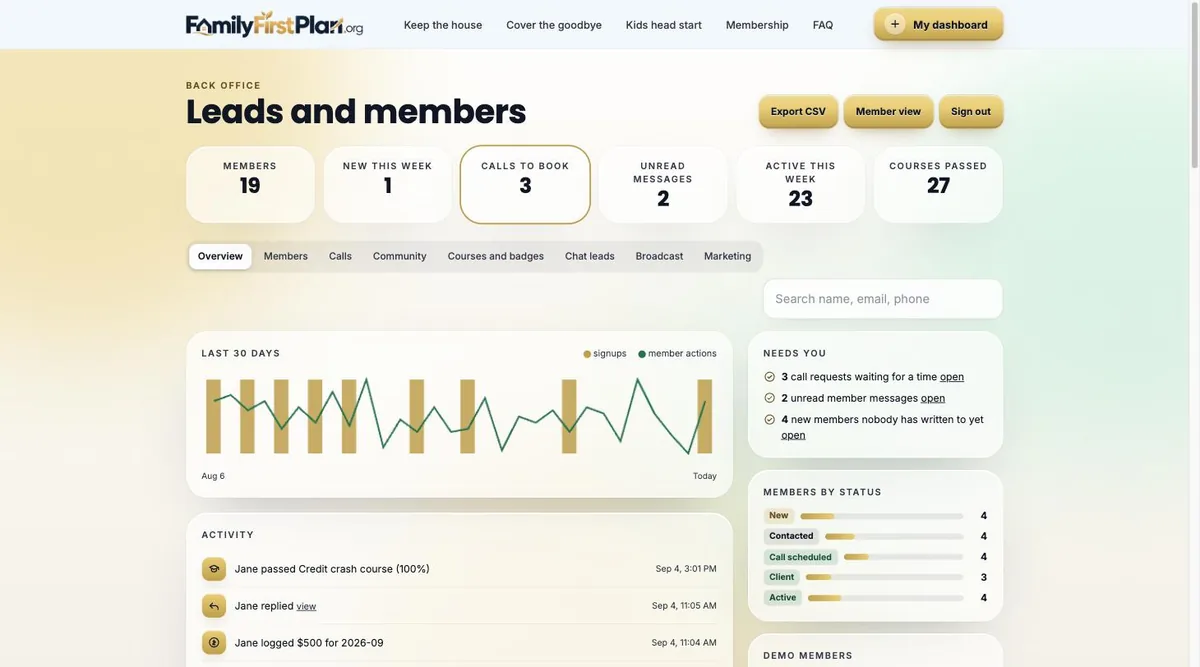
Every member tracked as New, Contacted, Call scheduled, Client or Active, with a live count at each stage.
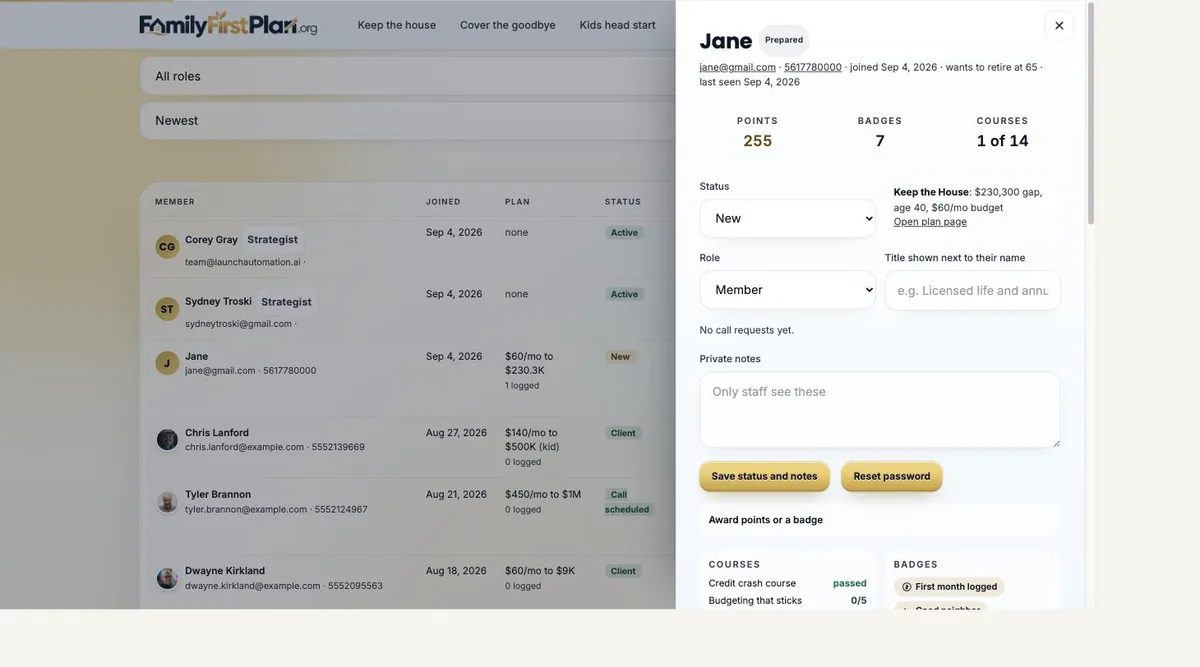
Staff-only notes, status changes, and the ability to award points or a badge by hand.
Three more admin tabs beyond what is pictured here, all reachable from the same back office.
The whole member list exports in one click, and Sydney can preview the site exactly as a member sees it.
What the owner actually runs
The half a website redesign never includes: the screens the business works out of every day, and what each one is for.
Signups, plans run and call requests on one screen, with statuses and the list of people nobody has replied to yet - the question being who needs an answer, not how many signed up.
The full list with statuses, filters and search, plus your own private notes on each person that they never see.
Message the whole membership, a filtered group, or a single member from their card - without exporting a list into a separate email tool first.
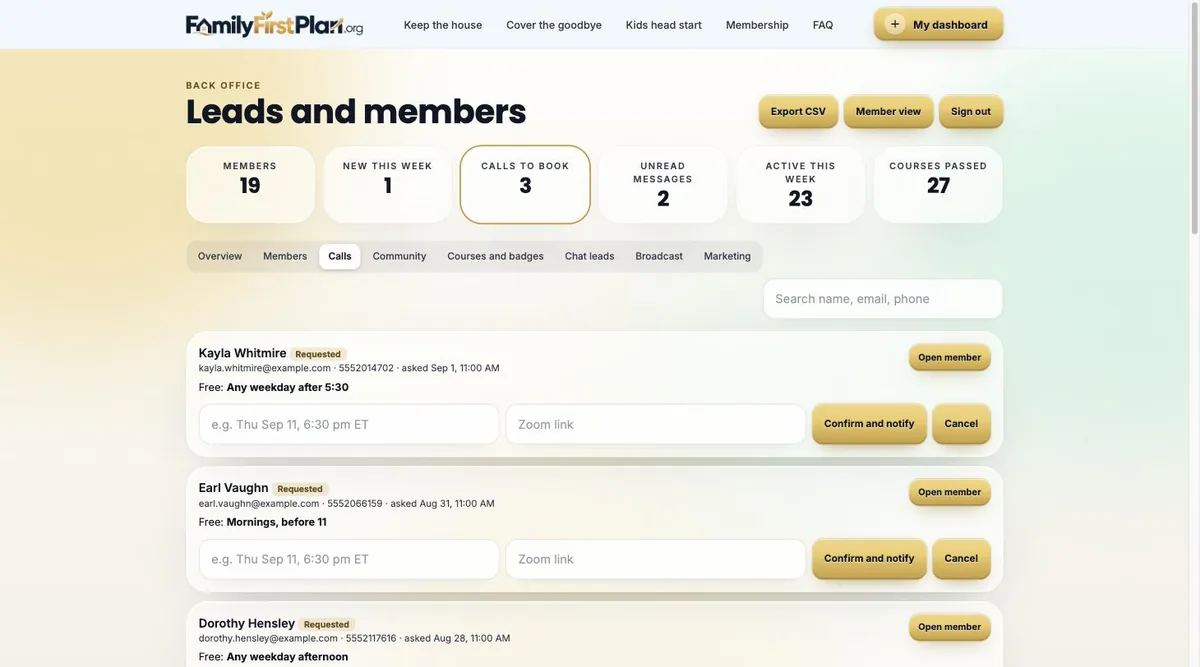
Every call request with what was asked for and when the person is free, so booking is a reply rather than a game of phone tag.
Approve, pin or remove posts and replies from one screen, so the public half of the membership stays something worth being judged on.
See which lessons get started and finished and which badges are actually earned, so the content earns its place instead of just sitting there.
Your details, your meeting link and your calendar link in one tab, plus a GoHighLevel connection so every lead lands in the CRM already being run.
A join is not just a name and an email - the calculator they ran and the number they saved are on the member card before the first hello.
Built for the Phone
The screen below is not a screenshot - it is the live site itself, loaded right now at phone width. Everything below was also tested at 320, 375, 390, 430, 768, 1024, 1440 and 1920 pixels wide, across 23 routes, with zero horizontal overflow and zero accessibility violations found.
Tested with Playwright and axe-core 4.10 across every public, member and admin route - not just the homepage.
What Machines See
A brand-new domain starts invisible. Here is what was put in place so search engines and AI assistants have something real to read.
A licensed agent isn’t just a name anymore.
She is structured data Google and AI can actually read.
We don’t promise rankings - nobody honestly can. We build sites that search engines and AI assistants can actually read.
The Scope
Here is everything actually delivered, in one list.
Mortgage protection, final expense and a kids IUL calculator, each a one-question-at-a-time wizard with a real result in 60 seconds.
Every visitor can join with no email wall on the calculators themselves and no paywall once inside.
Real courses with real quizzes - members earn a certificate with a unique code by actually passing.
Beyond the 3 public calculators, 31 more tools live inside the membership.
19 badges across 5 levels, with a real leaderboard ranking active members.
A public forum plus private messaging between members and Sydney.
Pipeline, private notes, call queue, community moderation, CSV export and more, all built in.
Visible, carrier-appropriate IUL disclosures and a multi-state licensing footer, not an afterthought.
Built for the Actual Business
Instead of one generic contact form, the site gives each part of Sydney’s business its own door in and its own way to turn a stranger into a lead.
Each card above opens the real, live page - the same one every visitor and every member actually uses.
Launch Readiness
No made-up traffic charts. Just what is finished, checked and waiting for the domain to be pointed at it.
At a Glance
No website, or a single static page
No way for a stranger to self-serve a number
No follow-up system for people not ready yet
Invisible to Google and AI assistants
Leads tracked in a notebook or not at all
No proof of licensing beyond a business card
3 calculators, a membership, a community
A real number in 60 seconds, no email required
14 courses and 31 tools keep leads coming back
Structured data built for search & AI
A full CRM pipeline in the back office
NPN, 10 licensed states, stated on the site
The Scope
Custom build, or a revenue-share platform
Design
Development
Membership & course infrastructure
CRM setup
SEO & compliance work
Hosting
Ongoing maintenance
Every future edit
One relationship, everything included
Complete site, membership & back office
Hosting & SSL included
Unlimited edits - you text it, we ship it
You own the site and the member data
Search & AI setup, kept current
Compliance-aware copy included
Real human support by text
This was a full membership platform built from a blank domain - calculators, courses, a community and a CRM, not just a marketing site.
How It Works
No existing website required. Text us what you do and who you serve. That is the whole assignment.
Lead calculators, a membership, a community and a CRM back office, built around your business, not a template.
You review everything at a private link, exactly like this page, before it ever replaces anything or goes live on your domain.
The questions a business owner actually has before building something like this.
No. There was no prior site. This build started from a blank domain, which is why this case study measures the finished build against itself rather than an old site.
No. This build proves it. Text us what your business does and we start from there, whether you have a site today or nothing at all.
Lead calculators or forms specific to your business, a free membership with courses and tools, a community, gamification, and a CRM back office where every lead lands. See the scope section above for the full list.
This build was $1,000 one time and is $297 a month going forward, which includes hosting, the back office and unlimited future edits. Custom membership platforms typically run $15,000 to $100,000 or more built the traditional way.
AI assistants like ChatGPT, Gemini and Perplexity are increasingly where people ask for recommendations. If your business isn’t described in a structured way those systems can read, you are invisible to that whole channel, not just to Google.
It is a hidden layer of your page written for machines instead of people: your business type, licensing, hours, service area and FAQs, in a format search engines and AI can parse directly instead of guessing from your visible text.
Most visitors are not ready to buy the day they show up. A free membership gives them a reason to come back - courses, tools, badges - so the relationship keeps building instead of going cold after one visit.
We build the visible disclosures, licensing statements and non-adviser language a compliance reviewer expects to see, and we flag anything that still needs a human legal read before launch. We are not a substitute for your compliance department.
We cannot promise a specific AI answer any more than we can promise a Google ranking. What we build is the structured, quotable content those systems pull from - the same FAQPage and entity data described in the What Machines See section above.
No. We can draft copy from a short conversation about your business and revise it with you. Photos and a logo help, but a build can start without them.
You keep unlimited edits for as long as you are on the plan - you text a change, we ship it. The back office keeps tracking every lead from day one.
Off-the-shelf membership platforms typically take 50% to 65% of your revenue and you never own the site or the member data. This is built specifically for your business, and you own it.
12 of 20 common questions shown here - a different set than our other case studies, picked for this build.