Case Study · Website + Membership Platform
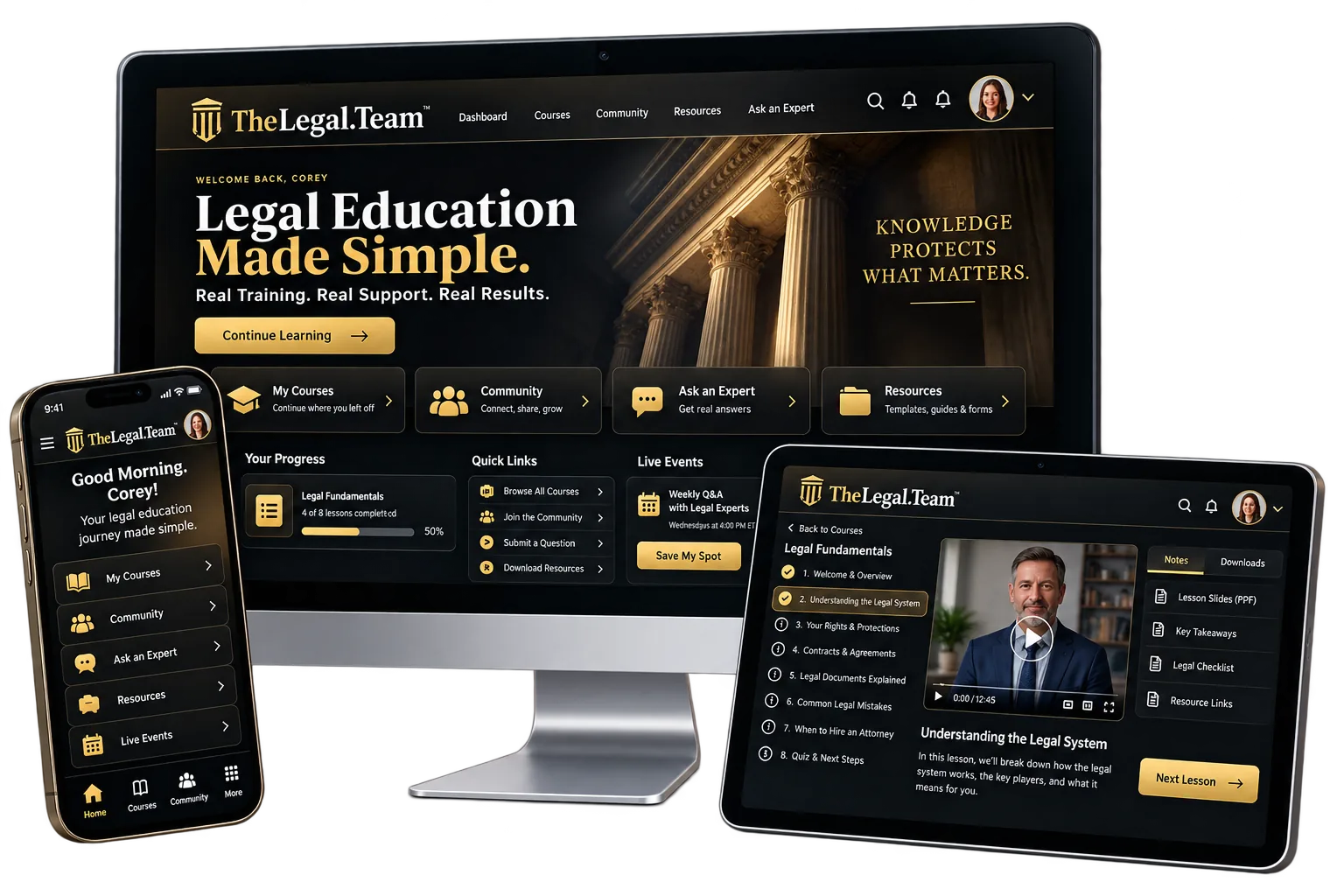
Chris Brown's domain, thelegal.team, forwarded to a third-party LegalShield page - not a site he owned or controlled. In 4 days we built TheLegal.Team from nothing: three free case-check calculators, a 10-attorney referral network across 8 practice areas, a free-for-life membership with 8 courses and 19 case tools, a live Q&A room, and a full CRM back office.
The Starting Point
Chris runs referral relationships with attorneys across several practice areas, but thelegal.team itself did not go anywhere he controlled. Here is what was missing before this build existed.
Someone just hurt, arrested, or pulled over had nowhere to answer a few questions and get an immediate, plain-English read on where they stood.
Nothing online showed the range of attorneys Chris could actually connect someone with - personal injury, criminal defense, DUI, family law, immigration and more.
Nothing built trust before a phone call - no courses, no tools, no reason to believe the site before ever talking to anyone.
A person mid-crisis is not always ready to commit the same day. With nothing to return to, that intent just evaporated.
A forwarding page carries no content of its own - invisible to Google, ChatGPT, or anyone asking an AI assistant what to do after an arrest or accident.
No CRM, no case pipeline, no way to see who needed a callback, who was mid-case, or who had gone quiet.
The Build, Measured
With a forwarding page as the starting point, this build is judged on its own numbers - checked directly against the live site, alongside the fixes made in the build's own final QA pass.
The WCAG and security-header fixes are drawn from the build's own documented QA pass and re-confirmed against the headers actually being served today.
What Was Built · The Public Site
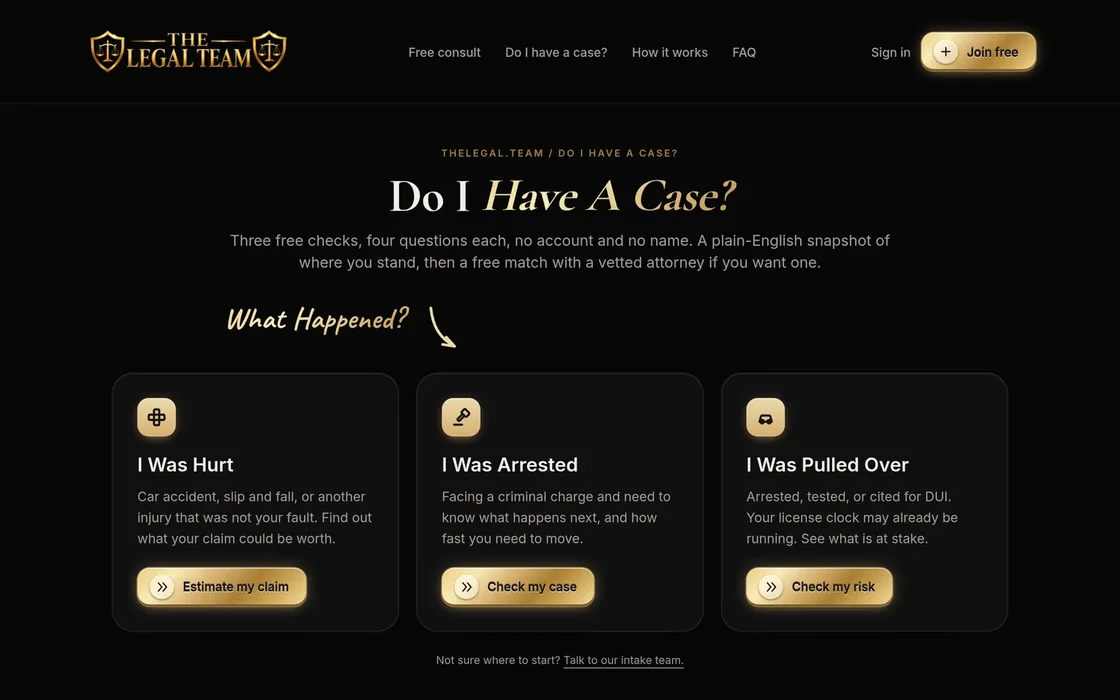
The home page is the intake form itself: describe what happened in your own words, and the AI-assisted intake reads it. Below that, three dedicated calculators handle the most common situations directly, and two more sections route foreclosure and collections cases into the same network. Tap any page to see the actual screenshot full size.
The home page also carries two more full sections: foreclosure defense for California and Nevada, and collections defense for law offices and small businesses - both route into the same intake and the same attorney network. See the “Built For The Actual Business” section below.
Inside the Members Area
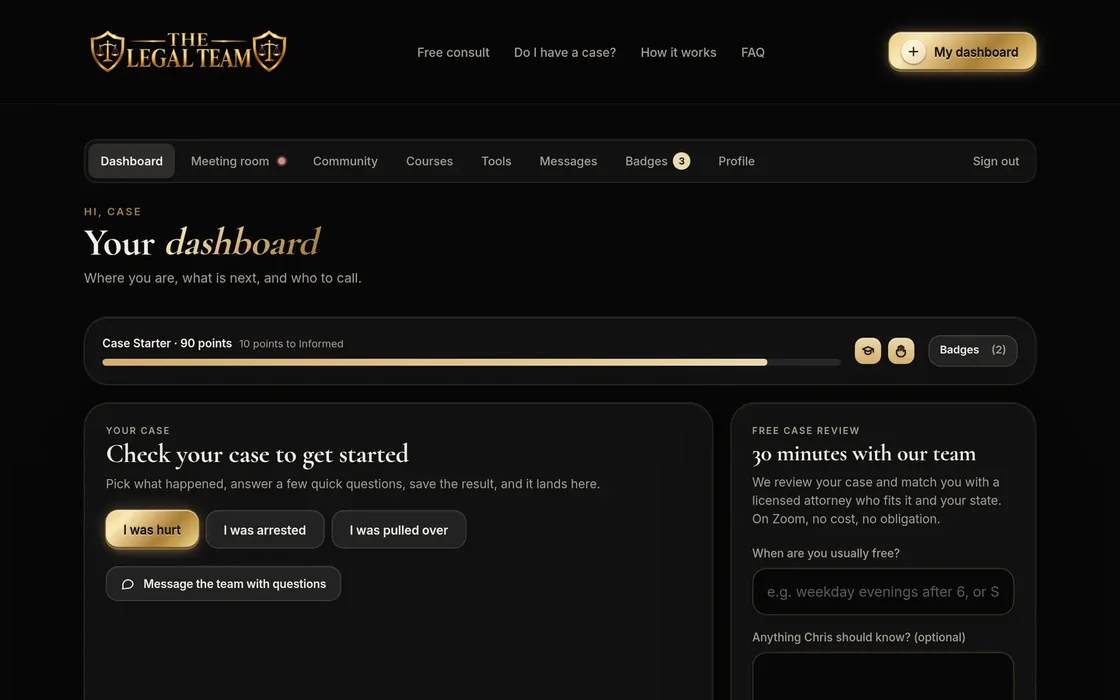
Anyone who runs a case check can join free for life. Once inside, they land in a real membership: a dashboard with their saved case, 8 courses with quizzes and printable certificates, 19 case tools, badges, levels and a leaderboard, a moderated community, private messaging, and a live Q&A room with Chris himself - all built to keep a person coming back instead of going cold after one visit.
10 distinct member templates in total - dashboard, courses, individual lessons, tools, community, the live room, messages, badges, profile and certificates - plus direct messaging with Chris's team. Only 7 are pictured above to keep this section readable; open the two lists above to see every course and every tool by name.
What a member actually gets
Most "membership" sites are a password on a brochure. Here is every feature a member can actually use, and what each one is for.
Injury claim value, criminal urgency, and DUI licence risk. Four questions each, asked one at a time, no account and no name required. Someone just hurt or just arrested gets a plain-English read on where they stand before they speak to anybody - and the result is saved to their account, so it is still there on the next visit.
About 8,500 words written in plain language for a phone screen. Each course ends in a quiz, and a pass mark earns points and a printable certificate.
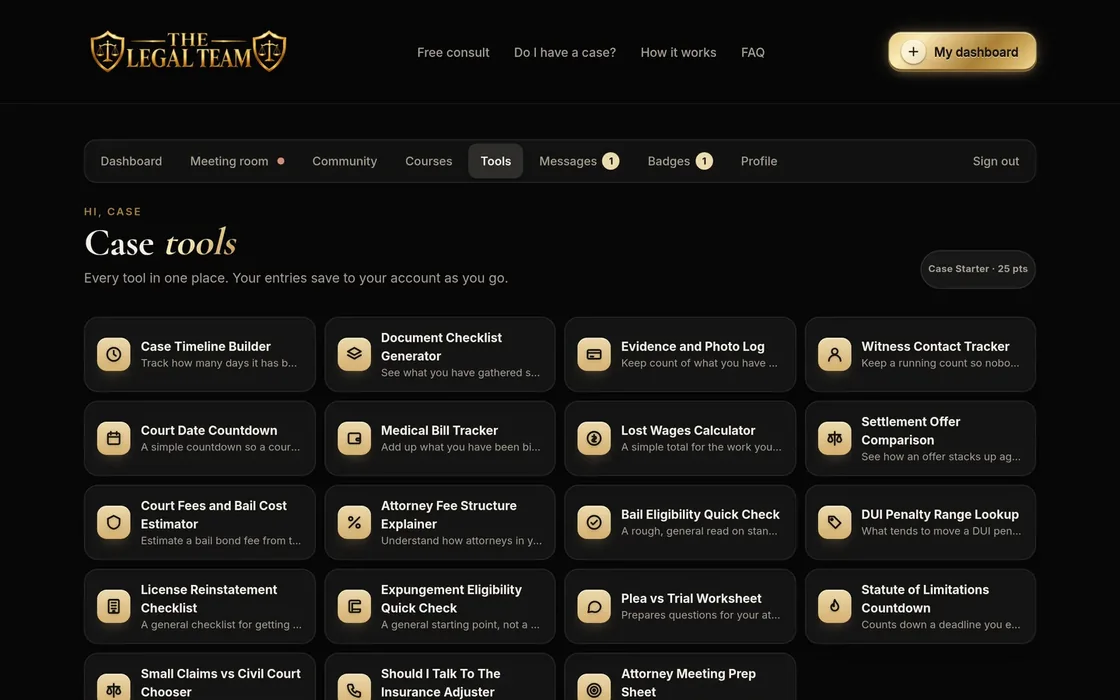
Case prep (timeline, documents, evidence, witnesses, court-date countdown), money (medical bills, lost wages, settlement comparison, bail and fee estimators), criminal and DUI (bail eligibility, penalty ranges, licence reinstatement, expungement, plea vs. trial) and legal literacy (statute of limitations, small claims vs. civil, talking to an adjuster, meeting prep). What a member types in is still there next visit.
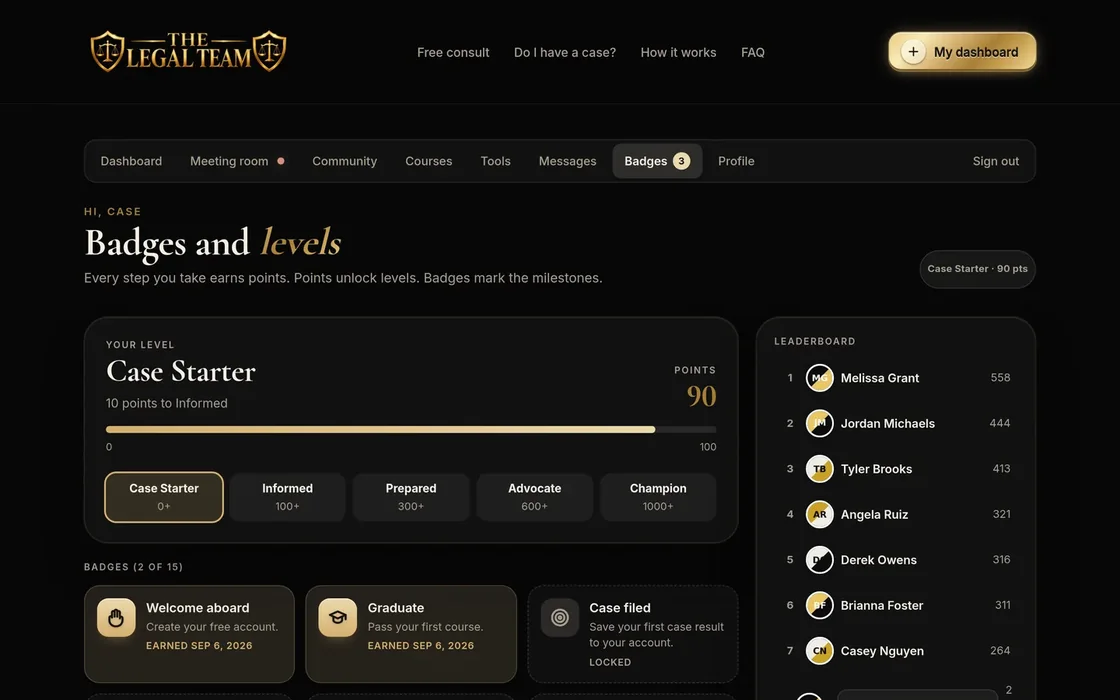
Case Starter through Champion, driven by points, each badge unlocking with a celebration on screen. Using five different case tools earns one of them.
Members build a case in the open - ask, answer, earn badges - with pinned announcements from the firm and house rules that keep it useful rather than a free-for-all.
A direct line to the intake team that is not a public post and not an email thread that gets lost. Threaded, per member, and visible in the back office.
A scheduled session inside the membership, run by the attorney - not a webinar funnel on somebody else's platform.
Answers the common questions at 11pm, asks a sensible follow-up, and drops the conversation into the back office as a chat lead rather than losing it.
The case check result, the tools they filled in, the courses they passed - all attached to one account, so returning does not mean starting over.
The Attorney Network
Every case that comes through the site is matched against a real network of attorney profiles seeded into the back office - not a single firm pretending to cover everything. Whoever answers a case check gets routed toward someone who actually practices in that area.
Ten seeded attorney profiles across these practice areas ship with the build so the network looks alive from day one - the same demo data referenced in the audit above, removable in one click before real people are invited in.
The Owner’s Back Office
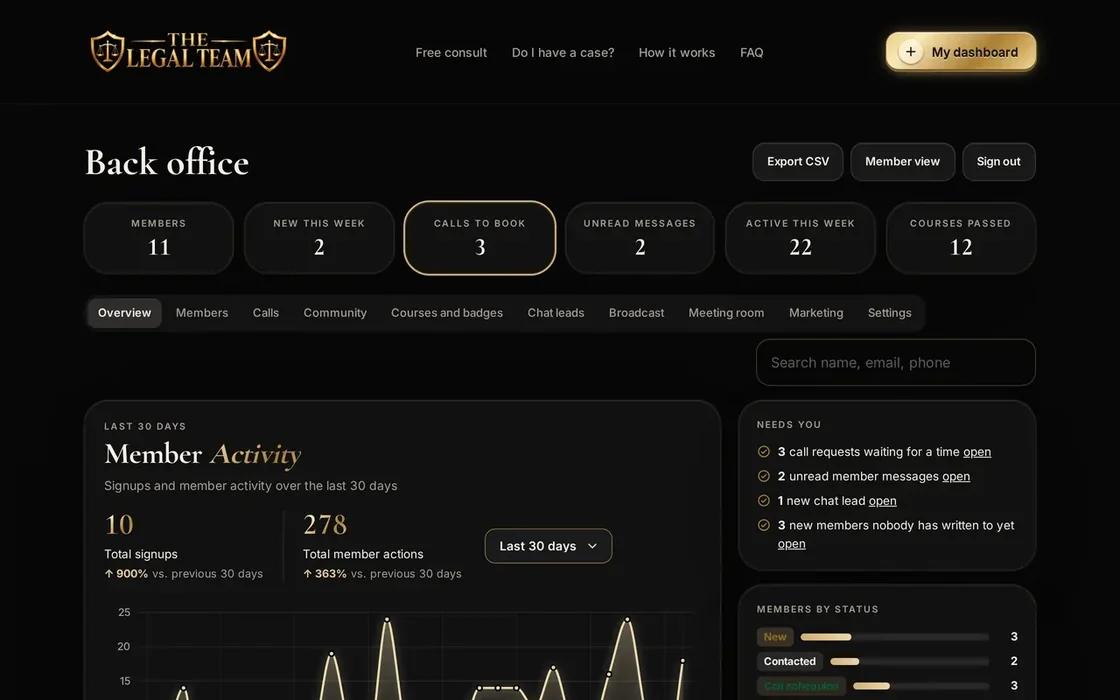
This is what most website redesigns skip entirely: the system Chris actually works out of every day. It is a real CRM built into the site, not a bolted-on spreadsheet, with an activity chart rebuilt from scratch in the final build week.
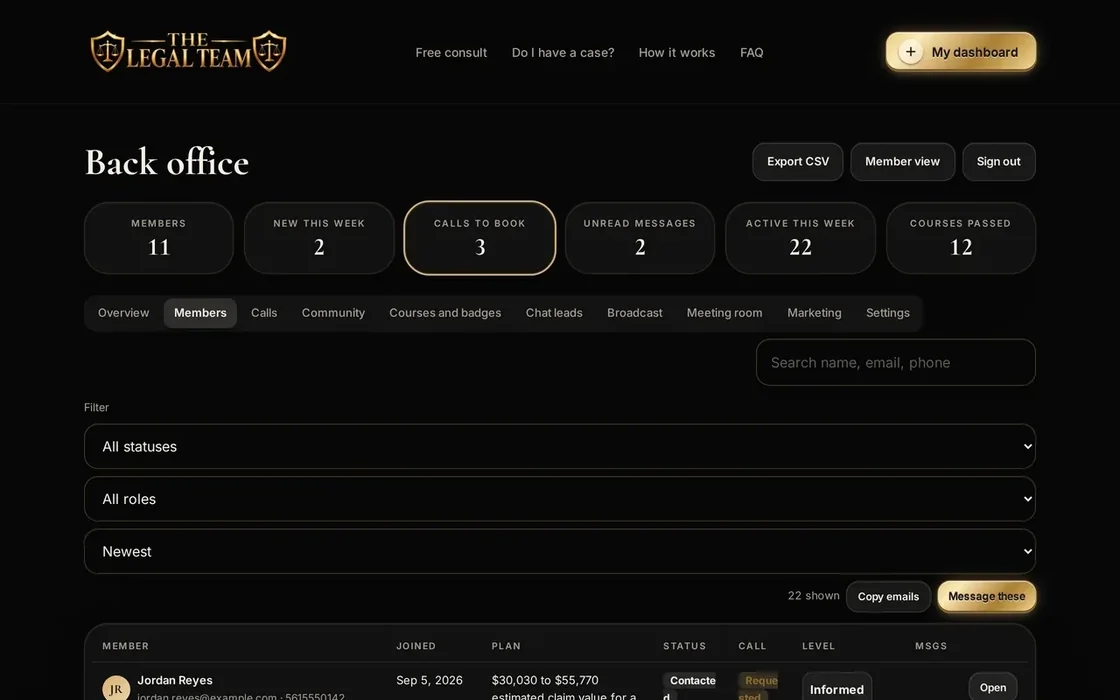
Every member tracked through the case lifecycle, with a live count at each stage and a filterable, searchable table.
Every intake conversation lands in a Chat Leads tab, and a Broadcast tab sends one message to every member at once.
Schedule a live session, paste the stream link, notify everyone, and flip it live from the same tab.
The whole member list exports in one click, and the 20 seeded demo accounts remove in one click before launch.
What the owner actually runs
The half of the build a website redesign never includes: the screens the firm works out of every day, and what each one is for.
Signups, case checks and calls plotted on a hand-built SVG activity chart with a 7, 30 and 90-day toggle, a crosshair and a tooltip - so the question "is this working?" has an answer on the screen rather than in a monthly report.
Filter and search the whole list, see exactly where each person sits in the pipeline, and export the lot to CSV. The list is yours, downloadable any time.
Your own record on a member card, never visible to them - plus a "needs you" list so the people waiting on a reply do not quietly go cold.
Message everyone at once, one segment from the Members tab, or a single member from their card - without exporting a list into another tool first.
Put a post at the top of the community so a live session, a new course or a deadline is the first thing every member sees.
The Calls tab collects each request with what the person asked for and when they are free, so booking is a reply rather than a game of phone tag.
Approve, pin or remove posts and replies from the same screen, so the public half of the membership stays something the firm is happy to be judged on.
Your details, your personal video meeting link and your calendar booking link in one tab - and a GoHighLevel connection so every lead lands in the CRM you already run.
The build ships seeded with ten attorney personas and ten members so nothing looks empty on day one - and one button clears them when the real ones arrive.
Built for the Phone
The screen below is not a screenshot - it is the live site itself, loaded right now at phone width. Someone who was just in an accident or just pulled over is almost never sitting at a laptop.
The phone above is the actual production site, embedded live - not a static image.
What Machines See
A forwarding page has no content of its own to index. Here is what was put in place instead, all fetched and confirmed directly from the live site during this write-up.
A referral business isn’t just a phone number anymore.
It is structured data Google and AI can actually read.
We don’t promise rankings - nobody honestly can. We build sites that search engines and AI assistants can actually read.
The Scope
Here is everything actually delivered, in one list.
Personal injury, criminal charges and DUI stops, each a one-question-at-a-time wizard with a real result in under a minute.
The home page and /start both accept a plain-language description of what happened, with an AI reading dates and details a rigid form would miss.
8 practice areas seeded and ready, from personal injury to bankruptcy, foreclosure and collections.
Real courses with real quizzes - members earn a certificate with a unique code by actually passing.
From an evidence log to a statute-of-limitations countdown, saved per member.
A scheduled live session with Chris, a countdown before it starts, and a replay list after.
Pipeline, chat leads, broadcast, meeting scheduler, community moderation, CSV export and more, all built in.
Matching-and-referral disclosures on every page, plus privacy, terms and disclosures pages.
Built for the Actual Business
Instead of one generic contact form, the site gives each kind of case its own door in and its own way to turn a stranger into a matched, tracked lead.
Each card above opens the real, live page - the same one every visitor and every member actually uses.
Launch Readiness
No made-up traffic charts. Just what is finished, checked and waiting for the domain to be pointed at it.
Because thelegal.
At a Glance
No content of its own to rank or read
No way for a stranger to self-check a case
No visible attorney network
No follow-up system for people not ready yet
No system behind the scenes
No proof of who actually handles a case
3 calculators, foreclosure & collections sections
A real answer in under a minute, no email required
10 attorneys across 8 practice areas
8 courses and 19 tools keep leads coming back
A full CRM pipeline in the back office
A live Q&A room with Chris himself
The Scope
Custom build, or a revenue-share lead platform
Design
Development
Membership & course infrastructure
CRM setup
Compliance & SEO work
Hosting
Ongoing maintenance
Every future edit
One relationship, everything included
Complete site, membership & back office
Hosting & SSL included
Unlimited edits - you text it, we ship it
You own the site and the member data
Search & AI setup, kept current
Referral-compliance copy included
Real human support by text
This was a full membership platform with a 10-attorney network, courses, tools, a live meeting room and a CRM built from a forwarding page, not just a marketing site.
How It Works
No existing website required, even a forwarding page is fine. Text us what you do and who you serve. That is the whole assignment.
Lead calculators, a network or membership, a community and a CRM back office, built around your business, not a template.
You review everything at a private link, exactly like this page, before it ever replaces anything or goes live on your domain.
The questions a business owner actually has before building something like this.
Not really. The domain, thelegal.team, forwarded to a third-party LegalShield page - not a site Chris owned or controlled. This build started from that forwarding page, which is why this case study measures the finished build against itself rather than an old site.
No. This build proves it. Text us what your business does and we start from there, whether you have a site today, a forwarding page, or nothing at all.
TheLegal.Team is a matching and referral platform, not a law firm - that is stated plainly on every page. It routes a visitor's situation to one of ten attorneys in the network by practice area, rather than promoting a single firm.
Lead calculators specific to your business, a free membership with courses and tools, a community, gamification, and a CRM back office where every lead lands. See the scope section above for the full list.
This build was $2,500 one time and is $997 a month going forward, which includes hosting, the back office and unlimited future edits. Custom membership platforms with an attorney-matching engine and a full back office typically run $25,000 to $150,000 or more built the traditional way.
No. Those three sit alongside foreclosure defense for California and Nevada and collections work for law offices and small businesses on the same site - the platform is built to route more than one kind of case to the right attorney.
Every build ships with sample members so the community and back office are not empty on day one. One button in the back office Overview tab removes all of them at once, right before real people are invited in.
AI assistants like ChatGPT, Gemini and Perplexity are increasingly where people ask for recommendations after something has just happened to them. If your business is not described in a structured way those systems can read, you are invisible to that whole channel, not just to Google.
It is a hidden layer of your page written for machines instead of people: your business type, service area and FAQs, in a format search engines and AI can parse directly instead of guessing from your visible text.
Someone who was just hurt, arrested, or pulled over is not always ready to call a lawyer the same day. A free membership with courses, tools and a community gives them a reason to come back, so the relationship keeps building instead of going cold after one visit.
We build the visible disclosures a compliance reviewer expects: that TheLegal.Team is a matching and referral platform, not a law firm, how referral fees work, and that nothing on the site is legal advice. We flag anything that still needs a human legal read before launch. We are not a substitute for a compliance department.
No. We can draft copy from a short conversation about your business and revise it with you. A logo helps, but a build can start without one.
You keep unlimited edits for as long as you are on the plan - you text a change, we ship it. The back office keeps tracking every lead from day one.
Off-the-shelf lead services sell you a shared lead and nothing else. This is a platform you own outright - the site, the membership, the attorney network and every member record - built specifically around your business.
13 of 18 questions live on the site itself are echoed here - a different set than our other case studies, picked for this build.